# Session resume and persistence
> This guide walks you through the SDK's session persistence capabilities—how to pause work, resume it later, and manage sessions in production environments.
- 网址:https://funcoding.ai/agents/github-copilot/how-tos/copilot-sdk/features/session-persistence/
- 来源:GitHub Copilot 官方文档原文(英文),CC-BY-4.0 许可,同步于 2026-10-11
- 官方原文:https://docs.github.com/en/copilot/how-tos/copilot-sdk/features/session-persistence
---
## How sessions work
When you create a session, the Copilot CLI maintains conversation history, tool state, and planning context. By default, this state lives in memory and disappears when the session ends. With persistence enabled, you can resume sessions across restarts, container migrations, or even different client instances.

| State | What happens |
|-------|--------------|
| **Create** | `session_id` assigned |
| **Active** | Send prompts, tool calls, responses |
| **Paused** | State saved to disk |
| **Resume** | State loaded from disk |
## Quick start: creating a resumable session
The key to resumable sessions is providing your own `session_id`. Without one, the SDK generates a random ID and the session can't be resumed later.
### TypeScript
```typescript
import { CopilotClient } from "@github/copilot-sdk";
const client = new CopilotClient();
// Create a session with a meaningful ID
const session = await client.createSession({
sessionId: "user-123-task-456",
model: "gpt-5.2-codex",
});
// Do some work...
await session.sendAndWait({ prompt: "Analyze my codebase" });
// Session state is automatically persisted
// You can safely close the client
```
### Python
```python
from copilot import CopilotClient
from copilot.session import PermissionHandler
client = CopilotClient()
await client.start()
# Create a session with a meaningful ID
session = await client.create_session(on_permission_request=PermissionHandler.approve_all, model="gpt-5.2-codex", session_id="user-123-task-456")
# Do some work...
await session.send_and_wait("Analyze my codebase")
# Session state is automatically persisted
```
### Go
```golang
ctx := context.Background()
client := copilot.NewClient(nil)
// Create a session with a meaningful ID
session, _ := client.CreateSession(ctx, &copilot.SessionConfig{
SessionID: "user-123-task-456",
Model: "gpt-5.2-codex",
})
// Do some work...
session.SendAndWait(ctx, copilot.MessageOptions{Prompt: "Analyze my codebase"})
// Session state is automatically persisted
```
### C# (.NET)
```csharp
using GitHub.Copilot;
var client = new CopilotClient();
// Create a session with a meaningful ID
var session = await client.CreateSessionAsync(new SessionConfig
{
SessionId = "user-123-task-456",
Model = "gpt-5.2-codex",
});
// Do some work...
await session.SendAndWaitAsync(new MessageOptions { Prompt = "Analyze my codebase" });
// Session state is automatically persisted
```
## Resuming a session
Later—minutes, hours, or even days—you can resume the session from where you left off.

### TypeScript
```typescript
// Resume from a different client instance (or after restart)
const session = await client.resumeSession("user-123-task-456");
// Continue where you left off
await session.sendAndWait({ prompt: "What did we discuss earlier?" });
```
### Python
```python
# Resume from a different client instance (or after restart)
session = await client.resume_session("user-123-task-456", on_permission_request=PermissionHandler.approve_all)
# Continue where you left off
await session.send_and_wait("What did we discuss earlier?")
```
### Go
```golang
ctx := context.Background()
// Resume from a different client instance (or after restart)
session, _ := client.ResumeSession(ctx, "user-123-task-456", nil)
// Continue where you left off
session.SendAndWait(ctx, copilot.MessageOptions{Prompt: "What did we discuss earlier?"})
```
### C# (.NET)
```csharp
// Resume from a different client instance (or after restart)
var session = await client.ResumeSessionAsync("user-123-task-456");
// Continue where you left off
await session.SendAndWaitAsync(new MessageOptions { Prompt = "What did we discuss earlier?" });
```
## Resume options
When resuming a session, you can optionally reconfigure many settings. This is useful when you need to change the model, update tool configurations, or modify behavior.
| Option | Description |
|--------|-------------|
| `model` | Change the model for the resumed session |
| `systemMessage` | Override or extend the system prompt |
| `availableTools` | Restrict which tools are available |
| `excludedTools` | Disable specific tools |
| `provider` | Re-provide BYOK credentials (required for BYOK sessions) |
| `capi.autoTier` | Override the persisted Auto routing preference |
| `capi.enableWebSocketResponses` | Choose the Responses API transport for the resumed session |
| `reasoningEffort` | Adjust reasoning effort level |
| `streaming` | Enable/disable streaming responses |
| `workingDirectory` | Change the working directory |
| `configDir` | Override configuration directory |
| `mcpServers` | Configure MCP servers |
| `customAgents` | Configure custom agents |
| `agent` | Pre-select a custom agent by name |
| `skillDirectories` | Directories to load skills from |
| `disabledSkills` | Skills to disable |
| `infiniteSessions` | Configure infinite session behavior |
### Auto tier persistence
With `model: "auto"`, the optional `capi.autoTier` setting selects an Auto routing preference: `efficiency`, `balance`, `intelligence`, or `fast`. In Python, use `capi={"auto_tier": "balance"}`. This setting applies to V2 Auto routing; V1 Auto requests are unchanged.
`fast` is an integrator-only latency preset, not a first-party GitHub Copilot product preference. The SDK does not decide Fast eligibility, inspect client identity, choose it as a default, or fall back to another tier when a runtime does not support it—an older runtime returns its native error unchanged.
The runtime persists the selected tier, so applications do not need to resend it on every resume:
* Omitting the tier when creating a session uses the runtime's default routing behavior.
* A cold resume restores the persisted tier. Supplying an explicit tier overrides the restored value for the new activation.
* When resuming a session already resident in the runtime, omitting the tier preserves the current selection and supplying the same tier is a no-op. Supplying a different tier requests a safe switch that the runtime applies after the resume succeeds; it cannot change a turn that is already in flight.
* Older sessions without a persisted tier retain default routing behavior.
Tier selection is not a live model-switch operation. The SDK forwards the preference; the runtime owns persistence and validation.
The `session.start` and `session.resume` events expose the selected tier in their optional `data.autoTier` field (`data.auto_tier` in Python). When no tier is selected, the field is omitted.
### Changing the Auto tier during a session
Call `setAutoTier` to change the routing preference on a live session without changing the selected model. Pass `null` (Python `None`, Go `nil`) to return to the provider's default Auto routing.
```typescript
const result = await session.setAutoTier("intelligence");
if (result.status === "pending") {
// Accepted, but not yet in effect.
}
```
The runtime does not apply the preference immediately. It records the request and commits it only when a later user turn using the `auto` model successfully obtains a usable model from the provider. A `pending` status therefore confirms that the request was accepted, not that it took effect. Only the most recent request survives: a new request replaces any earlier one that no turn has claimed yet.
Watch for the outcome through these events:
* `session.model_change` when the preference commits.
* `session.auto_tier_switch_failed` when it does not. This event is ephemeral, so the runtime never persists or replays it on resume. Its `reason` field is one of `policy_rejected`, `request_failed`, `setup_failed`, or `unsupported`, and the previously effective preference stays active.
You can also read the authoritative state at any time through the session's `model.getCurrent` RPC method, which reports the committed `autoTier`, any unclaimed `pendingAutoTier`, and the `activatingAutoTier` currently claimed by an in-progress activation.
| SDK | Change the tier | Return to provider-default routing |
|-----|-----------------|------------------------------------|
| Node.js | `session.setAutoTier("balance")` | `session.setAutoTier(null)` |
| Python | `session.set_auto_tier("balance")` | `session.set_auto_tier(None)` |
| Go | `session.SetAutoTier(ctx, &tier)` | `session.SetAutoTier(ctx, nil)` |
| .NET | `session.SetAutoTierAsync(AutoTier.Balance)` | `session.SetAutoTierAsync(null)` |
| Rust | `session.set_auto_tier(Some(AutoTier::Balance))` | `session.set_auto_tier(None)` |
| Java | `session.setAutoTier(AutoTier.BALANCE)` | `session.setAutoTier(null)` |
To select the `auto` model and its routing preference in a single call, stage the tier on the model switch instead. The runtime rejects this option when the model is anything other than `auto`.
| SDK | Stage a tier with the switch | Reset to provider-default routing |
|-----|------------------------------|-----------------------------------|
| Node.js | `setModel("auto", { autoTier: "balance" })` | `setModel("auto", { autoTier: null })` |
| Python | `set_model("auto", auto_tier="balance")` | `set_model("auto", auto_tier=None)` |
| Go | `SetModelOptions{AutoTier: &tier}` | `SetModelOptions{ResetAutoTier: true}` |
| .NET | `new SetModelOptions { AutoTier = AutoTier.Balance }` | `new SetModelOptions { ResetAutoTier = true }` |
| Rust | `SetModelOptions::default().with_auto_tier(AutoTier::Balance)` | `SetModelOptions::default().with_reset_auto_tier()` |
| Java | `new SetModelOptions().setModel("auto").setAutoTier(AutoTier.BALANCE)` | `new SetModelOptions().setModel("auto").setResetAutoTier(true)` |
Node.js, Python, and Rust express all three states in a single value: Node.js and Python because `null`/`None` is distinguishable from an omitted argument, and Rust because `AutoTierPreference::Reset` is a distinct variant of the same option. Go, .NET, and Java have no way to distinguish "reset" from "unset" in one value, so they carry a separate reset flag. Omitting both always means "leave the current preference alone."
### Responses transport on resume
The optional `capi.enableWebSocketResponses` setting chooses the transport for the CAPI Responses API. It defaults to `true`, so the WebSocket transport is used whenever the selected model advertises the `ws:/responses` endpoint. Setting it to `false` falls back to the HTTP transport. In Python, use `capi={"enable_web_socket_responses": False}`.
Supply it on the resume call when you need it. It is worth setting when WebSocket connections fail behind a proxy, and when a resumed session reports `400 input item ID does not belong to this connection`, which is specific to the WebSocket transport.
```typescript
const session = await client.resumeSession("user-123-task-456", {
capi: { enableWebSocketResponses: false },
});
```
Setting this to `false` is equivalent to the `COPILOT_CLI_DISABLE_WEBSOCKET_RESPONSES` environment variable, which has the opposite polarity.
### Example: changing model on resume
```typescript
// Resume with a different model
const session = await client.resumeSession("user-123-task-456", {
model: "claude-sonnet-4", // Switch to a different model
reasoningEffort: "high", // Increase reasoning effort
});
```
## Using BYOK (bring your own key) with resumed sessions
When using your own API keys, you must re-provide the provider configuration when resuming. API keys are never persisted to disk for security reasons.
```typescript
// Original session with BYOK
const session = await client.createSession({
sessionId: "user-123-task-456",
model: "gpt-5.2-codex",
provider: {
type: "azure",
endpoint: "https://my-resource.openai.azure.com",
apiKey: process.env.AZURE_OPENAI_KEY,
deploymentId: "my-gpt-deployment",
},
});
// When resuming, you MUST re-provide the provider config
const resumed = await client.resumeSession("user-123-task-456", {
provider: {
type: "azure",
endpoint: "https://my-resource.openai.azure.com",
apiKey: process.env.AZURE_OPENAI_KEY, // Required again
deploymentId: "my-gpt-deployment",
},
});
```
## What gets persisted?
Session state is saved to `~/.copilot/session-state/{sessionId}/`:
```text
~/.copilot/session-state/
└── user-123-task-456/
├── checkpoints/ # Conversation history snapshots
│ ├── 001.json # Initial state
│ ├── 002.json # After first interaction
│ └── ... # Incremental checkpoints
├── plan.md # Agent's planning state (if any)
└── files/ # Session artifacts
├── analysis.md # Files the agent created
└── notes.txt # Working documents
```
| Data | Persisted? | Notes |
|------|------------|-------|
| Conversation history | ✅ Yes | Full message thread |
| Tool call results | ✅ Yes | Cached for context |
| Agent planning state | ✅ Yes | `plan.md` file |
| Session artifacts | ✅ Yes | In `files/` directory |
| Provider/API keys | ❌ No | Security: must re-provide |
| In-memory tool state | ❌ No | Tools should be stateless |
## Session ID best practices
Choose session IDs that encode ownership and purpose. This makes auditing and cleanup much easier.
| Pattern | Example | Use Case |
|---------|---------|----------|
| ❌ `abc123` | Random IDs | Hard to audit, no ownership info |
| ✅ `user-{userId}-{taskId}` | `user-alice-pr-review-42` | Multi-user apps |
| ✅ `tenant-{tenantId}-{workflow}` | `tenant-acme-onboarding` | Multi-tenant SaaS |
| ✅ `{userId}-{taskId}-{timestamp}` | `alice-deploy-1706932800` | Time-based cleanup |
**Benefits of structured IDs:**
* Easy to audit: "Show all sessions for user alice"
* Easy to clean up: "Delete all sessions older than X"
* Natural access control: Parse user ID from session ID
### Example: generating session IDs
```typescript
function createSessionId(userId: string, taskType: string): string {
const timestamp = Date.now();
return `${userId}-${taskType}-${timestamp}`;
}
const sessionId = createSessionId("alice", "code-review");
// → "alice-code-review-1706932800000"
```
```python
import time
def create_session_id(user_id: str, task_type: str) -> str:
timestamp = int(time.time())
return f"{user_id}-{task_type}-{timestamp}"
session_id = create_session_id("alice", "code-review")
# → "alice-code-review-1706932800"
```
## Managing session lifecycle
### Listing active sessions
```typescript
// List all sessions
const sessions = await client.listSessions();
console.log(`Found ${sessions.length} sessions`);
for (const session of sessions) {
console.log(`- ${session.sessionId} (created: ${session.createdAt})`);
}
// Filter sessions by repository
const repoSessions = await client.listSessions({ repository: "owner/repo" });
```
### Cleaning up old sessions
```typescript
async function cleanupExpiredSessions(maxAgeMs: number) {
const sessions = await client.listSessions();
const now = Date.now();
for (const session of sessions) {
const age = now - new Date(session.createdAt).getTime();
if (age > maxAgeMs) {
await client.deleteSession(session.sessionId);
console.log(`Deleted expired session: ${session.sessionId}`);
}
}
}
// Clean up sessions older than 24 hours
await cleanupExpiredSessions(24 * 60 * 60 * 1000);
```
### Disconnecting from a session (`disconnect`)
When a task completes, disconnect from the session explicitly rather than waiting for timeouts. This releases in-memory resources but **preserves session data on disk**, so the session can still be resumed later:
```typescript
try {
// Do work...
await session.sendAndWait({ prompt: "Complete the task" });
// Task complete — release in-memory resources (session can be resumed later)
await session.disconnect();
} catch (error) {
// Clean up even on error
await session.disconnect();
throw error;
}
```
Each SDK also provides idiomatic automatic cleanup patterns:
| Language | Pattern | Example |
|----------|---------|---------|
| **TypeScript** | `Symbol.asyncDispose` | `await using session = await client.createSession(config);` |
| **Python** | `async with` context manager | `async with await client.create_session(on_permission_request=handler) as session:` |
| **C#** | `IAsyncDisposable` | `await using var session = await client.CreateSessionAsync(config);` |
| **Go** | `defer` | `defer session.Disconnect()` |
`destroy()` is deprecated in favor of `disconnect()`. Existing code using `destroy()` will continue to work but should be migrated.
### Permanently deleting a session (`deleteSession`)
To permanently remove a session and all its data from disk (conversation history, planning state, artifacts), use `deleteSession`. This is irreversible—the session **cannot** be resumed after deletion:
```typescript
// Permanently remove session data
await client.deleteSession("user-123-task-456");
```
> **`disconnect()` vs `deleteSession()`:** `disconnect()` releases in-memory resources but keeps session data on disk for later resumption. `deleteSession()` permanently removes everything, including files on disk.
## Automatic cleanup: idle timeout
By default, sessions have **no idle timeout** and live indefinitely until explicitly disconnected or deleted. You can optionally configure a server-wide idle timeout via `CopilotClientOptions.sessionIdleTimeoutSeconds`:
```typescript
const client = new CopilotClient({
sessionIdleTimeoutSeconds: 30 * 60, // 30 minutes
});
```
When a timeout is configured, sessions without activity for that duration are automatically cleaned up. Set to `0` or omit to disable.
This option only applies when the SDK spawns the runtime process. When connecting to an existing server via `cliUrl`, the server's own timeout configuration applies.

Sessions with active work (running commands, background agents) are always protected from idle cleanup, regardless of the timeout setting.
Listen for idle events to react to session inactivity:
```typescript
session.on("session.idle", (event) => {
console.log(`Session idle for ${event.idleDurationMs}ms`);
});
```
## Deployment patterns
### Pattern 1: one CLI server per user (recommended)
Best for: Strong isolation, multi-tenant environments, Azure Dynamic Sessions.
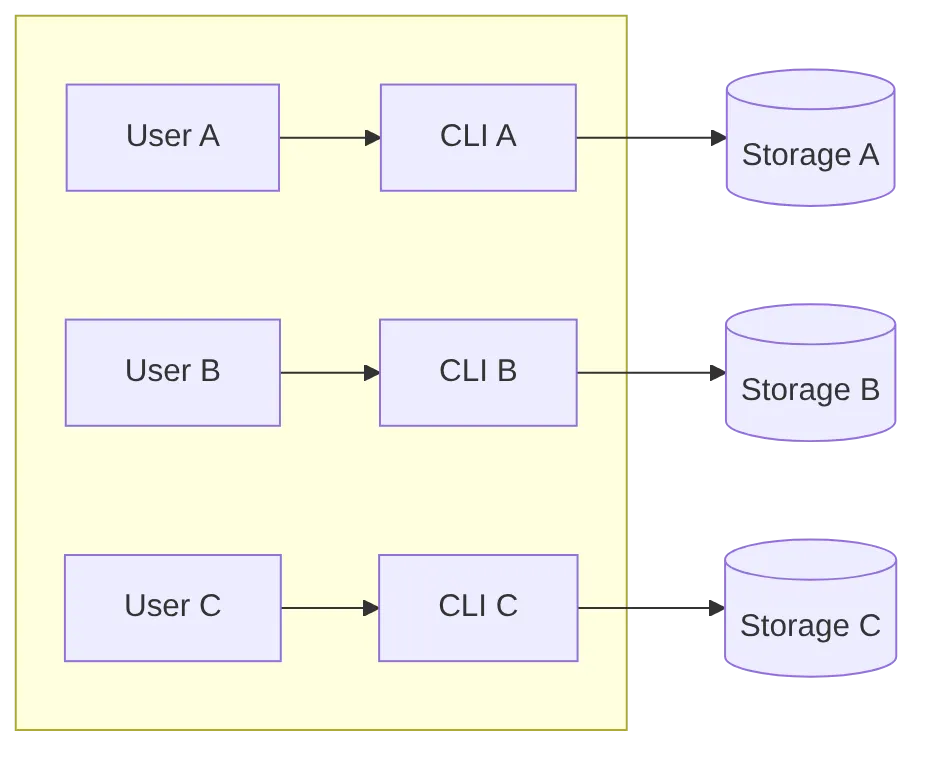
**Benefits:** ✅ Complete isolation | ✅ Simple security | ✅ Easy scaling
### Pattern 2: shared CLI server (resource efficient)
Best for: Internal tools, trusted environments, resource-constrained setups.
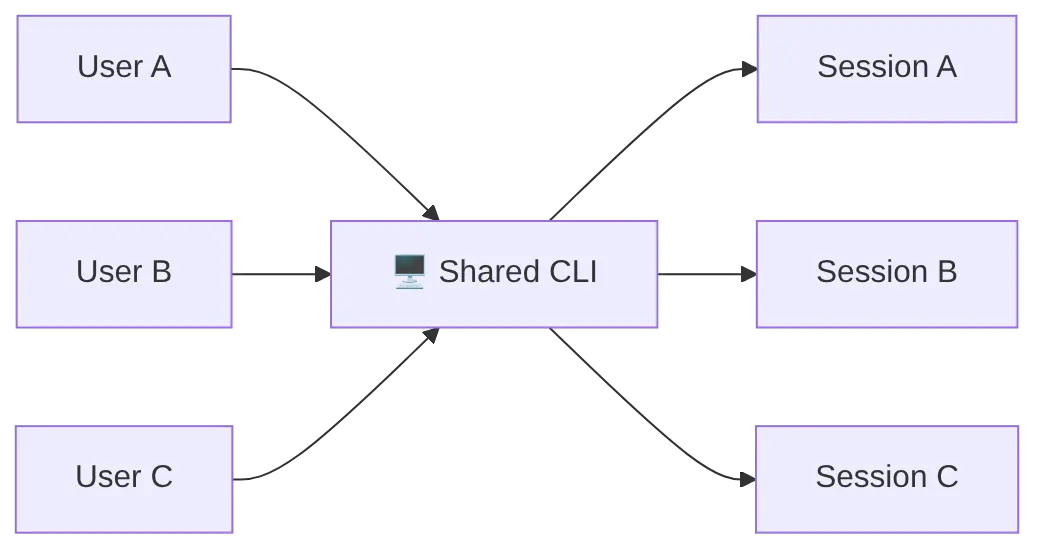
**Requirements:**
* ⚠️ Unique session IDs per user
* ⚠️ Application-level access control
* ⚠️ Session ID validation before operations
```typescript
// Application-level access control for shared CLI
async function resumeSessionWithAuth(
client: CopilotClient,
sessionId: string,
currentUserId: string
): Promise {
// Parse user from session ID
const [sessionUserId] = sessionId.split("-");
if (sessionUserId !== currentUserId) {
throw new Error("Access denied: session belongs to another user");
}
return client.resumeSession(sessionId);
}
```
## Azure dynamic sessions
For serverless/container deployments where containers can restart or migrate:
### Mount persistent storage
The session state directory must be mounted to persistent storage:
```yaml
# Azure Container Instance example
containers:
- name: copilot-agent
image: my-agent:latest
volumeMounts:
- name: session-storage
mountPath: /home/app/.copilot/session-state
volumes:
- name: session-storage
azureFile:
shareName: copilot-sessions
storageAccountName: myaccount
```

**Session survives container restarts!**
## Infinite sessions for long-running workflows
For workflows that might exceed context limits, enable infinite sessions with automatic compaction:
```typescript
const session = await client.createSession({
sessionId: "long-workflow-123",
infiniteSessions: {
enabled: true,
backgroundCompactionThreshold: 0.80, // Start compaction at 80% context
bufferExhaustionThreshold: 0.95, // Block at 95% if needed
},
});
```
Thresholds are context utilization ratios (0.0-1.0), not absolute token counts. See the [AUTOTITLE](https://funcoding.ai/agents/github-copilot/how-tos/copilot-sdk/troubleshooting/compatibility/) for details.
## Limitations and considerations
| Limitation | Description | Mitigation |
|------------|-------------|------------|
| **BYOK re-authentication** | API keys aren't persisted | Store keys in your secret manager; provide on resume |
| **Writable storage** | `~/.copilot/session-state/` must be writable | Mount persistent volume in containers |
| **No session locking** | Concurrent access to same session is undefined | Implement application-level locking or queue |
| **Tool state not persisted** | In-memory tool state is lost | Design tools to be stateless or persist their own state |
### Handling concurrent access
The SDK doesn't provide built-in session locking. If multiple clients might access the same session:
```typescript
// Option 1: Application-level locking with Redis
import Redis from "ioredis";
const redis = new Redis();
async function withSessionLock(
sessionId: string,
fn: () => Promise
): Promise {
const lockKey = `session-lock:${sessionId}`;
const acquired = await redis.set(lockKey, "locked", "NX", "EX", 300);
if (!acquired) {
throw new Error("Session is in use by another client");
}
try {
return await fn();
} finally {
await redis.del(lockKey);
}
}
// Usage
await withSessionLock("user-123-task-456", async () => {
const session = await client.resumeSession("user-123-task-456");
await session.sendAndWait({ prompt: "Continue the task" });
});
```
## Summary
| Feature | How to Use |
|---------|------------|
| **Create resumable session** | Provide your own `sessionId` |
| **Resume session** | `client.resumeSession(sessionId)` |
| **BYOK resume** | Re-provide `provider` config |
| **List sessions** | `client.listSessions(filter?)` |
| **Disconnect from active session** | `session.disconnect()`—releases in-memory resources; session data on disk is preserved for resumption |
| **Delete session permanently** | `client.deleteSession(sessionId)`—permanently removes all session data from disk; cannot be resumed |
| **Containerized deployment** | Mount `~/.copilot/session-state/` to persistent storage |
## Next steps
* [AUTOTITLE](https://funcoding.ai/agents/github-copilot/how-tos/copilot-sdk/hooks/hooks-overview/) - Customize session behavior with hooks
* [AUTOTITLE](https://funcoding.ai/agents/github-copilot/how-tos/copilot-sdk/troubleshooting/compatibility/) - SDK vs CLI feature comparison
* [AUTOTITLE](https://funcoding.ai/agents/github-copilot/how-tos/copilot-sdk/troubleshooting/debugging/) - Troubleshoot session issues