
 koala73/worldmonitor88k
World Monitor
Live markets, conflicts, country risk, chokepoints, energy, and China decision signals. 90 tools.
AI 与智能体

A simple CLI to run LLM prompt and implement MCP client.
A simple CLI program to run LLM prompt and implement Model Context Protocol (MCP) client.
You can use any MCP-compatible servers from the convenience of your terminal.
This act as alternative client beside Claude Desktop. Additionally you can use any LLM provider like OpenAI, Groq, or local LLM model via llama.
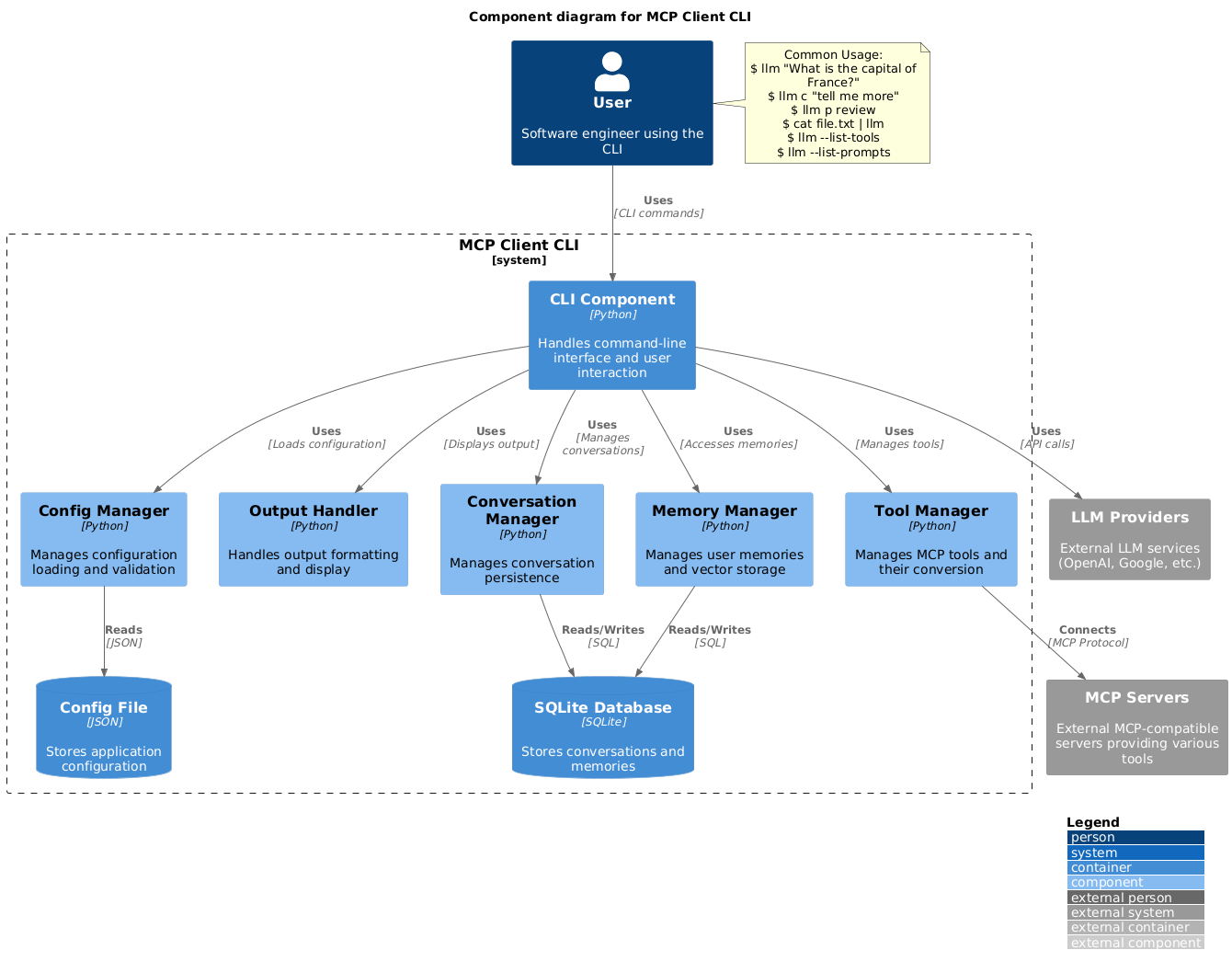
Install via pip:
pip install mcp-client-cli
Create a ~/.llm/config.json file to configure your LLM and MCP servers:
{
  "systemPrompt": "You are an AI assistant helping a software engineer...",
  "llm": {
    "provider": "openai",
    "model": "gpt-4",
    "api_key": "your-openai-api-key",
    "temperature": 0.7,
    "base_url": "https://api.openai.com/v1"  // Optional, for OpenRouter or other providers
  },
  "mcpServers": {
    "fetch": {
      "command": "uvx",
      "args": ["mcp-server-fetch"],
      "requires_confirmation": ["fetch"],
      "enabled": true,  // Optional, defaults to true
      "exclude_tools": []  // Optional, list of tool names to exclude
    },
    "brave-search": {
      "command": "npx",
      "args": ["-y", "@modelcontextprotocol/server-brave-search"],
      "env": {
        "BRAVE_API_KEY": "your-brave-api-key"
      },
      "requires_confirmation": ["brave_web_search"]
    },
    "youtube": {
      "command": "uvx",
      "args": ["--from", "git+https://github.com/adhikasp/mcp-youtube", "mcp-youtube"]
    }
  }
}
Note:
requires_confirmation to specify which tools need user confirmation before executionLLM_API_KEY or OPENAI_API_KEY~/.llm/config.json or $PWD/.llm/config.json// if you like to switch around the configurationRun the CLI:
llm "What is the capital city of North Sumatra?"
$ llm What is the capital city of North Sumatra?
The capital city of North Sumatra is Medan.
You can omit the quotes, but be careful with bash special characters like &, |, ; that might be interpreted by your shell.
You can also pipe input from other commands or files:
$ echo "What is the capital city of North Sumatra?" | llm
The capital city of North Sumatra is Medan.

$ echo "Given a location, tell me its capital city." > instructions.txt
$ cat instruction.txt | llm "West Java"
The capital city of West Java is Bandung.
You can pipe image files to analyze them with multimodal LLMs:
$ cat image.jpg | llm "What do you see in this image?"
[LLM will analyze and describe the image]

$ cat screenshot.png | llm "Is there any error in this screenshot?"
[LLM will analyze the screenshot and point out any errors]
You can use predefined prompt templates by using the p prefix followed by the template name and its arguments:
# List available prompt templates
$ llm --list-prompts

# Use a template
$ llm p review  # Review git changes
$ llm p commit  # Generate commit message
$ llm p yt url=https://youtube.com/...  # Summarize YouTube video
$ llm What is the top article on hackernews today?

================================== Ai Message ==================================
Tool Calls:
  brave_web_search (call_eXmFQizLUp8TKBgPtgFo71et)
 Call ID: call_eXmFQizLUp8TKBgPtgFo71et
  Args:
    query: site:news.ycombinator.com
    count: 1
Brave Search MCP Server running on stdio

# If the tool requires confirmation, you'll be prompted:
Confirm tool call? [y/n]: y

================================== Ai Message ==================================
Tool Calls:
  fetch (call_xH32S0QKqMfudgN1ZGV6vH1P)
 Call ID: call_xH32S0QKqMfudgN1ZGV6vH1P
  Args:
    url: https://news.ycombinator.com/
================================= Tool Message =================================
Name: fetch

[TextContent(type='text', text='Contents [REDACTED]]
================================== Ai Message ==================================

The top article on Hacker News today is:

### [Why pipes sometimes get "stuck": buffering](https://jvns.ca)
- **Points:** 31
- **Posted by:** tanelpoder
- **Posted:** 1 hour ago

You can view the full list of articles on [Hacker News](https://news.ycombinator.com/)
To bypass tool confirmation requirements, use the --no-confirmations flag:
$ llm --no-confirmations "What is the top article on hackernews today?"
To use in bash scripts, add the --no-intermediates, so it doesn't print intermediate messages, only the concluding end message.
$ llm --no-intermediates "What is the time in Tokyo right now?"
Add a c prefix to your message to continue the last conversation.
$ llm asldkfjasdfkl
It seems like your message might have been a typo or an error. Could you please clarify or provide more details about what you need help with?
$ llm c what did i say previously?
You previously typed "asldkfjasdfkl," which appears to be a random string of characters. If you meant to ask something specific or if you have a question, please let me know!
You can use content from your clipboard using the cb command:
# After copying text to clipboard
$ llm cb
[LLM will process the clipboard text]

$ llm cb "What language is this code written in?"
[LLM will analyze the clipboard text with your question]

# After copying an image to clipboard
$ llm cb "What do you see in this image?"
[LLM will analyze the clipboard image]

# You can combine it with continuation
$ llm cb c "Tell me more about what you see"
[LLM will continue the conversation about the clipboard content]
The clipboard feature works in:
pbpaste for text, pngpaste for images (optional)xclip (required for clipboard support)powershell.exe from WSLRequired tools for clipboard support:
pbpaste (built-in) for textpngpaste (optional) for images: brew install pngpastexclip: sudo apt install xclip or equivalentThe CLI automatically detects if the clipboard content is text or image and handles it appropriately.
$ llm --list-tools                # List all available tools
$ llm --list-prompts              # List available prompt templates
$ llm --no-tools                  # Run without any tools
$ llm --force-refresh             # Force refresh tool capabilities cache
$ llm --text-only                 # Output raw text without markdown formatting
$ llm --show-memories             # Show user memories
$ llm --model gpt-4               # Override the model specified in config
Feel free to submit issues and pull requests for improvements or bug fixes.
koala73/worldmonitor88kLive markets, conflicts, country risk, chokepoints, energy, and China decision signals. 90 tools.
AI 与智能体

 ahujasid/mcp-for-blender30k
Community plugin to control Blender 3D with any LLM of your choice. Not affiliated with the official Blender Foundation.
AI 与智能体

 oraios/serena30k
A powerful MCP toolkit for coding, providing semantic retrieval and editing capabilities - the IDE for your agent
AI 与智能体

 agentskills/agentskills26k
Search and discover Agent Skills from the skills.sh registry. Powered by HAPI MCP server.
AI 与智能体

 activepieces/activepieces25k
AI Agents & MCPs & AI Workflow Automation • (~400 MCP servers for AI agents) • AI Automation / AI Agent with MCPs • AI Workflows & AI Agents • MCPs for AI Agents
AI 与智能体

 czlonkowski/n8n-mcp23k
A MCP for Claude Desktop / Claude Code / Windsurf / Cursor to build n8n workflows for you
AI 与智能体