
 koala73/worldmonitor88k
World Monitor
Live markets, conflicts, country risk, chokepoints, energy, and China decision signals. 90 tools.
AI 与智能体

Free, two-way Figma MCP server. Turn designs into framework-aware code, and push code back to the canvas. Works with Claude Code, Cursor, Codex, and any MCP client.
A free, two-way Figma MCP server for coding agents.
Pairs with a Figma plugin, not a Dev Mode seat.
About · Setup · Skills · Tools · Plugin · FAQ · Contributing


Figwright connects an MCP server to a Figma plugin over a local WebSocket relay, so an AI agent (Claude Code, Cursor, Codex, or any other MCP client) can work with Figma instead of just looking at it.
It works in both directions:
Read: turn a Figma selection into framework-aware code, grounded on faithful, de-duplicated design context (layout, typography, variables, components).
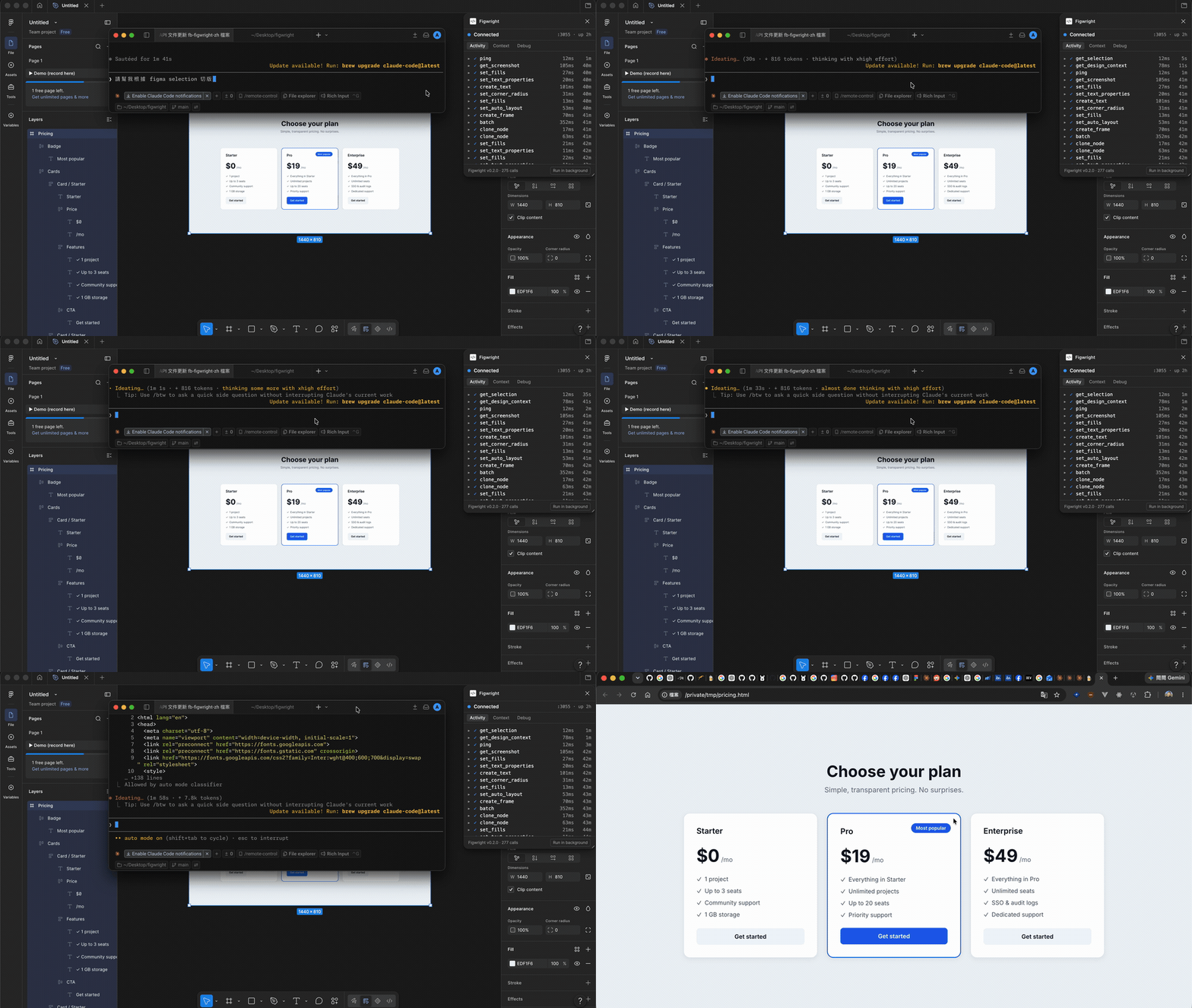
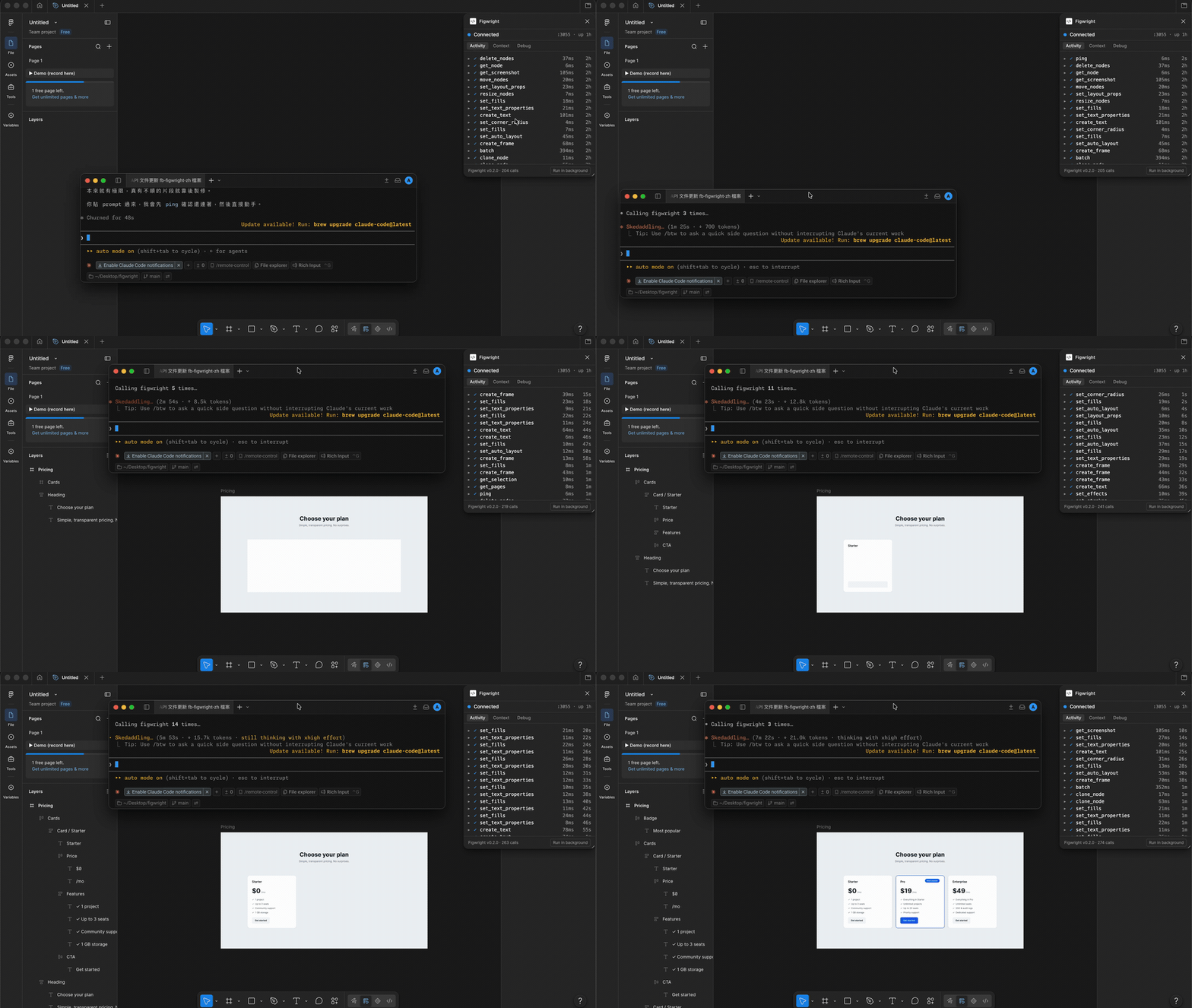
Write: author and edit the canvas directly, from frames and text to auto-layout, styles, variables, components, whole screens.
Everything runs on your machine: the server, the relay, and the plugin. Your designs are never sent anywhere.
You need an MCP client (Claude Code, Cursor, …), Node.js 20.19+ or 22.12+, and Figma. The free Figma tier is enough, though the desktop app is needed to import the plugin. The server runs via npx as its own process, so its Node version is independent of the one your project builds with; Node 18/21 and 22.0–22.11 are not supported.
For Claude Code, add this to your .mcp.json (other clients use the same shape):
{
  "mcpServers": {
    "figwright": {
      "command": "npx",
      "args": ["-y", "@figwright/mcp@latest"]
    }
  }
}
npx fetches and runs the published server, so no global install is needed.
The plugin isn't on the Figma Community marketplace yet, so install it from the latest release:
manifest.json.Open the Figwright plugin in Figma (Plugins → Development → Figwright). It connects to the local server automatically and shows Connected. Ask your agent to run ping to confirm the link.
The skills make agents reach for Figwright at the right moment and follow the grounded workflows:
npx skills add awdr74100/figwright/skills
With a frame selected in Figma, prompt your agent:
Code this Figma selection as a React component.
or, the other direction:
Build a pricing section in Figma from this spec.
Agent skills orchestrate Figwright's tools. They are model-invoked: your agent loads one automatically when the task matches its description.
| Skill | What it does |
|---|---|
figma‑codegen | Turn a Figma selection into framework-aware code, grounded on your stack and existing components. |
figma‑build | Build a Figma design from code or a description, reusing the file's existing components and styles. |
Install across any supported agent with the skills CLI:
npx skills add awdr74100/figwright/skills      # both
npx skills add https://github.com/awdr74100/figwright/tree/main/skills/figma-codegen  # one
Note
Skills need the
@figwright/mcpserver connected. On their own they have no tools to drive.
Figwright exposes 117 MCP tools in three groups:
list_files / use_file for working across more than one open Figma file at once.batch tool to apply many edits at once.get_design_context for faithful, de-duplicated design context, and component_map / token_map / icon_map, which join Figma data to your codebase so codegen reuses what you already have; plus design_diff, which reports what changed in a design against a saved baseline so you update only the affected code.Tip
Your MCP client lists every tool at connect time, which is always the authoritative, up-to-date catalog.
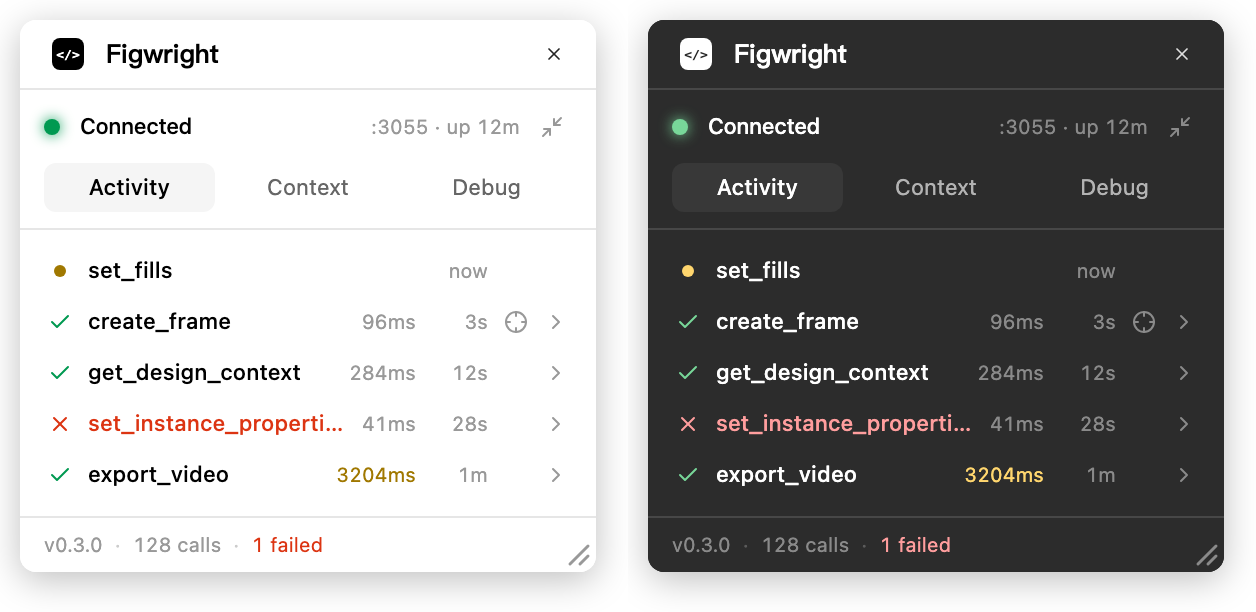
The Figma-side plugin isn't a black box. It shows every call as it happens, lets you inspect the exact payload sent to the model, and surfaces its own connection health.
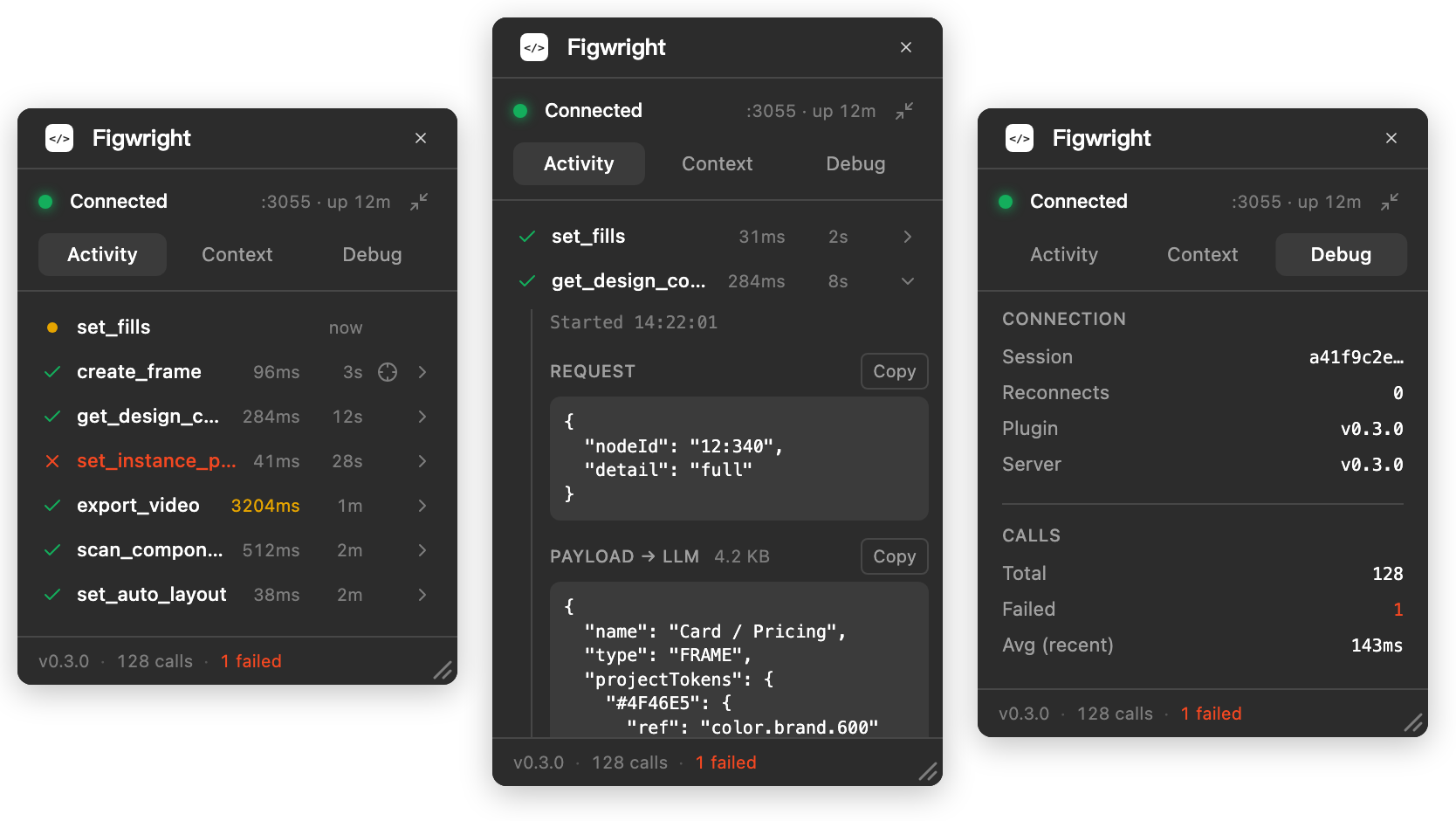
Activity: every call, with timing and a jump to the nodes it touched · Payload: exactly what the model received · Debug: health, versions, and a one-click diagnostic bundle
And it follows your Figma theme, light or dark.
The window is yours to arrange. Drag the bottom-right corner to resize it. A taller panel keeps more of the log in view, and the size is remembered next time you open it. Or put it away: Run in background, in the panel header right under Figma's own ✕, hides the panel while the connection stays live, so a long-running agent keeps working. Run the plugin again to bring it back. The ✕ above it closes the plugin instead, connection and all.
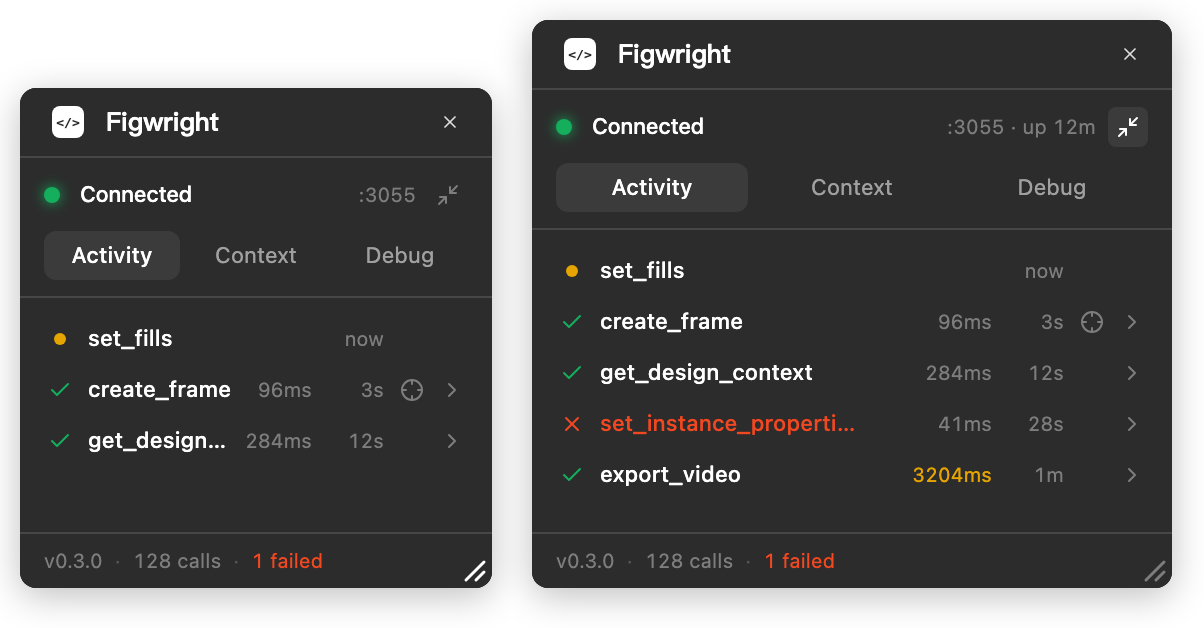
Resize: drag the corner, the size sticks · Background: the panel hides, the relay stays connected
Your MCP client talks to the @figwright/mcp server over stdio; the server relays to the Figma plugin over a local WebSocket. Several clients can share one plugin (they elect a leader that owns the connection), and the transport is built to ride out dropped sockets:
┌─────────────────────────────────────────────────────────────────────┐
│ MCP CLIENTS  ·  one per agent                                       │
│ Claude Code · Cursor · Claude · any MCP-capable client              │
└─────────────────────────────────────────────────────────────────────┘
                                   │  MCP protocol over stdio
                                   ▼
┌─────────────────────────────────────────────────────────────────────┐
│ @figwright/mcp  ·  your client launches one; they elect a leader    │
│                                                                     │
│ LEADER   (owns the single plugin connection)                        │
│    • WebSocket relay · request idempotency                          │
│    • routes to the most-recently-active file                        │
│    • session resume · "busy ≠ dead" heartbeat                       │
│    • endpoints:  /ws (plugin) · /ping (health) · /rpc (followers)   │
│                                                                     │
│ FOLLOWERS                                                           │
│    • forward tool calls to the leader over HTTP /rpc                │
│    • take over automatically if the leader exits                    │
└─────────────────────────────────────────────────────────────────────┘
                                   │  local WebSocket · msgpack (binary)
                                   ▼
┌─────────────────────────────────────────────────────────────────────┐
│ FIGMA  (desktop or browser)                                         │
│                                                                     │
│ ┌─────────────────────────────────────────────────────────────────┐ │
│ │ Figwright plugin                                                │ │
│ │   • UI (Vue 3 iframe): WebSocket client + heartbeat             │ │
│ │   • sandbox: executes Figma Plugin API calls                    │ │
│ └─────────────────────────────────────────────────────────────────┘ │
│                                                                     │
│              │ Figma Plugin API                                     │
│              ▼                                                      │
│            Canvas                                                   │
└─────────────────────────────────────────────────────────────────────┘
By design Figwright is provider-first: rather than a fixed compiler pipeline, the tools surface honest design context and let the model generate code that matches your codebase. The figma-codegen skill encodes this approach.
Figwright runs entirely on your machine: your client launches the server over stdio, the server relays to the plugin over a WebSocket on 127.0.0.1:3055, and nothing is sent anywhere else. The plugin uses only Figma's public Plugin API, so it reaches the file you have open and nothing beyond it.
Loopback is not on its own a boundary, since a web page you visit can still reach a local port, so the relay gates every request on two headers a page cannot forge: Host, which must name loopback (this is what stops DNS rebinding), and Origin, which admits the plugin's sandboxed handshake and refuses browsers everywhere else. The leader's HTTP endpoints additionally require a media type that cannot be sent without a CORS preflight. See MCP Security Best Practices for the wider picture, and SECURITY.md for Figwright's threat model, what is in and out of scope, and how to report a vulnerability privately.
Figwright is not a substitute for reviewing what your agent does. Its write tools change your Figma file and its export tools write files to paths the agent chooses; an agent acting on a malicious design or a prompt-injected instruction can misuse both. Your MCP client's tool-approval controls are the boundary that matters.
command not found, or it fails / disconnects with -32000 ("Connection closed").Both come down to how your MCP client launches the server: it spawns the command directly, not through your interactive shell, so it inherits none of what your shell sets up. That bites hardest when Node is managed by a version manager (fnm, nvm, asdf, volta, mise), since those configure PATH and npm from shell hooks that only run in a real terminal. It is not specific to Figwright; it affects any npx-launched MCP server. There are two symptoms, with two different fixes.
command not found: the client can't find npx / node on its PATH.
Use an absolute path. In a normal terminal run which npx (or which node) and use that full path as command:
{
  "mcpServers": {
    "figwright": {
      "command": "/Users/you/.local/share/fnm/node-versions/v24.x.x/installation/bin/npx",
      "args": ["-y", "@figwright/mcp@latest"]
    }
  }
}
Or pass PATH through env. If your client supports a per-server env, add your version manager's bin directory to env.PATH.
-32000 / "Connection closed" / it just never connects: npx runs, but the server exits before the handshake.
npx … @latest re-resolves the package from the registry on every launch. In a directly-spawned environment that step can fail or stall (empty or different npm config, a corporate proxy or private registry that is not configured there, or no network), so the process dies before MCP connects and the client reports the connection as closed. (A missing node for the binary's shebang lands here too.)
The fix is to install the package so launch needs no registry fetch:
As a project dependency, the quickest unblock. Install it, then drop @latest from your config. The @latest tag is what forces the registry round-trip; without it, npx uses the copy already in node_modules (a project-scoped config like Claude Code's .mcp.json runs from your project root):
pnpm add -D @figwright/mcp # or: npm i -D @figwright/mcp
{
  "mcpServers": {
    "figwright": {
      "command": "npx",
      "args": ["-y", "@figwright/mcp"]
    }
  }
}
Or globally, pinned to the binary. Install once, then point command straight at it, with no npx and no per-launch resolution. Use the absolute path from which figwright-mcp:
npm i -g @figwright/mcp
which figwright-mcp
{
  "mcpServers": {
    "figwright": {
      "command": "/absolute/path/to/figwright-mcp"
    }
  }
}
The server is launched by your MCP client, so it only runs while that client is open. Check that:
ping);127.0.0.1);The plugin's Debug tab lists both versions side by side, so a mismatch is visible in one place.
Mostly you don't need to look. The two halves update through different channels — the server re-resolves itself on every launch via npx @latest, while the plugin is a zip you imported by hand and then stop thinking about — so drifting apart is the normal state here rather than an edge case. It is also a silent one: a handler that predates an argument ignores it without erroring, so a write can report success having done only part of what was asked. When your plugin is old enough for that, the panel says so and tells you how to update, and every tool result tells your agent the result is unverified.
It stays quiet on a difference that cannot bite — a plugin a version behind a server that changed no arguments is fine — so when the warning does appear it is worth acting on.
No. Figwright talks to Figma through a plugin, so the free tier is enough. No Dev Mode seat or paid tier required.
It runs in both, with less available than in Figma Design, because those editors give plugins less rather than because Figwright holds anything back.
get_metadata reports the editor (editorType / mode), and any tool that fails because of the editor says so in its error, so an agent can re-plan rather than retry.
Yes. Several MCP servers can share a single plugin via leader/follower election: one leads, the others follow, with a graceful handoff if the leader goes away.
Yes, once each agent claims its file.
By default calls follow whichever file you last touched, so switching tabs switches what the agent sees — the right behaviour for one agent, and the wrong one for two, since the agent whose file isn't in front would silently get the other file's nodes. Whenever more than one file is open and an agent hasn't claimed one, every result it gets says so, so it can claim one before building anything on the wrong file.
list_files shows every file that currently has the plugin open, and use_file claims one for that agent:
> use the marketing site file
  → use_file({ fileName: "Marketing Site" })
The claim belongs to that agent's own server process, so it never affects the other agent, it survives closing and reopening the plugin panel, and calls keep reaching the file even while its tab sits in the background. That process is also the unit: one per MCP client, so the agents have to be separate clients — two editors, or two terminals. Everything inside one of them, subagents included, shares a server and therefore shares a claim. If two open files share a name (x and a second x), use_file refuses the name and asks for the sessionId that list_files prints, rather than guessing. Release it with use_file({ release: true }) to go back to following the foreground file.
Contributions are welcome. See CONTRIBUTING.md for how to get set up and open a pull request, and AGENTS.md for the architecture, repo layout, tech stack, and conventions.
figwright follows the -wright tradition, an old English word for a maker or craftsman: a playwright writes plays, a shipwright builds ships, a wheelwright, wheels. The name is a nod to Playwright, which automates the browser. Where Playwright drives the browser, Figwright drives Figma, a maker of designs that both reads the canvas and crafts work back onto it.
MIT © Roya
koala73/worldmonitor88kLive markets, conflicts, country risk, chokepoints, energy, and China decision signals. 90 tools.
AI 与智能体

 ahujasid/mcp-for-blender30k
Community plugin to control Blender 3D with any LLM of your choice. Not affiliated with the official Blender Foundation.
AI 与智能体

 oraios/serena30k
A powerful MCP toolkit for coding, providing semantic retrieval and editing capabilities - the IDE for your agent
AI 与智能体

 agentskills/agentskills26k
Search and discover Agent Skills from the skills.sh registry. Powered by HAPI MCP server.
AI 与智能体

 activepieces/activepieces25k
AI Agents & MCPs & AI Workflow Automation • (~400 MCP servers for AI agents) • AI Automation / AI Agent with MCPs • AI Workflows & AI Agents • MCPs for AI Agents
AI 与智能体

 czlonkowski/n8n-mcp23k
A MCP for Claude Desktop / Claude Code / Windsurf / Cursor to build n8n workflows for you
AI 与智能体