Every factory has a team of default agents: a foreman that coordinates the work, plus triage, spec, implement, and review agents.
The foreman is the agent that coordinates a factory's work and communicates with you. It delegates work to other agents, asks for your decisions when needed, and returns results. Four other default agents each cover one part of the software development lifecycle: triage scopes the request, spec writes the plan, implement writes the code, and review checks it. Together they take a work item from the moment it reaches your factory to a pull request ready for review.
The default agents
Every factory gets a foreman, and you choose one to four other agents to go with it. These defaults are a starting point — you can add custom agents and automations for work they don't cover. The default agents' prompts, descriptions, and models are reproduced as files in 00-warp-default-agents in the warp-factory-examples repository.
Agent
What it does
What it produces
Foreman
Coordinates the work and talks to the requester
Decisions, questions, status updates, and the final handoff
Triage
Investigates the request and establishes scope
Evidence, issue context, complexity, and open questions
Spec
Turns requirements into a concrete plan with validation criteria
Product and technical specs in a draft pull request
Implement
Makes and validates the code change
Code, tests, validation results, and visual evidence
Review
Independently checks the finished change
Findings and a recommendation
These are responsibilities, not a fixed pipeline. A small, well-understood change can skip the Planning stage entirely, and review can send work back for another pass. By default, work that goes through Planning needs a human to approve the spec before the Building stage starts.
The foreman agent runs the factory floor. It decides which agent a work item goes to next, hands the work over, and keeps the requester informed. It's the only default agent that talks to the requester directly. When another agent needs a human answer, the foreman asks the question and routes the answer back. For revisions and follow-ups, the foreman goes back to the same agent and continues its existing conversation instead of starting a new one, so no context is lost.
When the work is done, the foreman presents the final pull request and its supporting evidence, then marks the work item complete. Complete means the work was handed to a human, not that the change was merged or deployed. Merging stays with your team.
Foreman name
The foreman answers to a handle your team @-mentions in Slack and Linear, labeled Foreman name under Settings > Identity in the factory dashboard and written as alias in the definition. Factory setup copies it from the factory's name, so unless you change one of them, payments is the factory's name and @payments reaches its foreman.
They are still two things: the handle addresses the foreman, and the foreman speaks for the factory. Give them different names if the overlap causes confusion on your team.
Triage
Triage researches the codebase and related issues first, and reproduces a problem only when research can't establish the cause. It reports context, scope, complexity, and open questions that the foreman uses to decide whether to ask the requester for clarification, request a spec, or go straight to implementation.
Spec
Spec works through the foreman to define requirements, then writes product and technical specifications in a draft pull request with criteria for validating the change. The implement agent later continues that pull request. By default, the foreman waits for a person to approve the spec before implementation starts. Change that in the foreman's instructions.
Implement
Implement continues the spec's branch and draft pull request rather than starting over. It adds tests, runs the repository's validation, and, when computer use is available, captures visual evidence of user-facing changes. If review finds problems, implement revises. It never merges.
Review
Review independently examines the change for unmet requirements, broken conventions, missing or failing tests, security issues, and evidence that doesn't hold up. It reruns or extends validation where the evidence is thin, then recommends accepting, revising, or asking a human to decide. The recommendation is advice — review doesn't approve or merge the pull request.
Built-in skills
Every default agent comes with GitHub skills, and the foreman also comes with a Slack skill. The issue tracker you choose during setup adds to that baseline: choosing Linear or Jira gives the agents that tracker's skill and instructions. If you don't choose a tracker, the agents get only the baseline skills. Define custom procedures with factory skills to extend what an agent can do beyond the built-in set.
Configure agent behavior
From the factory dashboard sidebar, select your factory and click Agents.
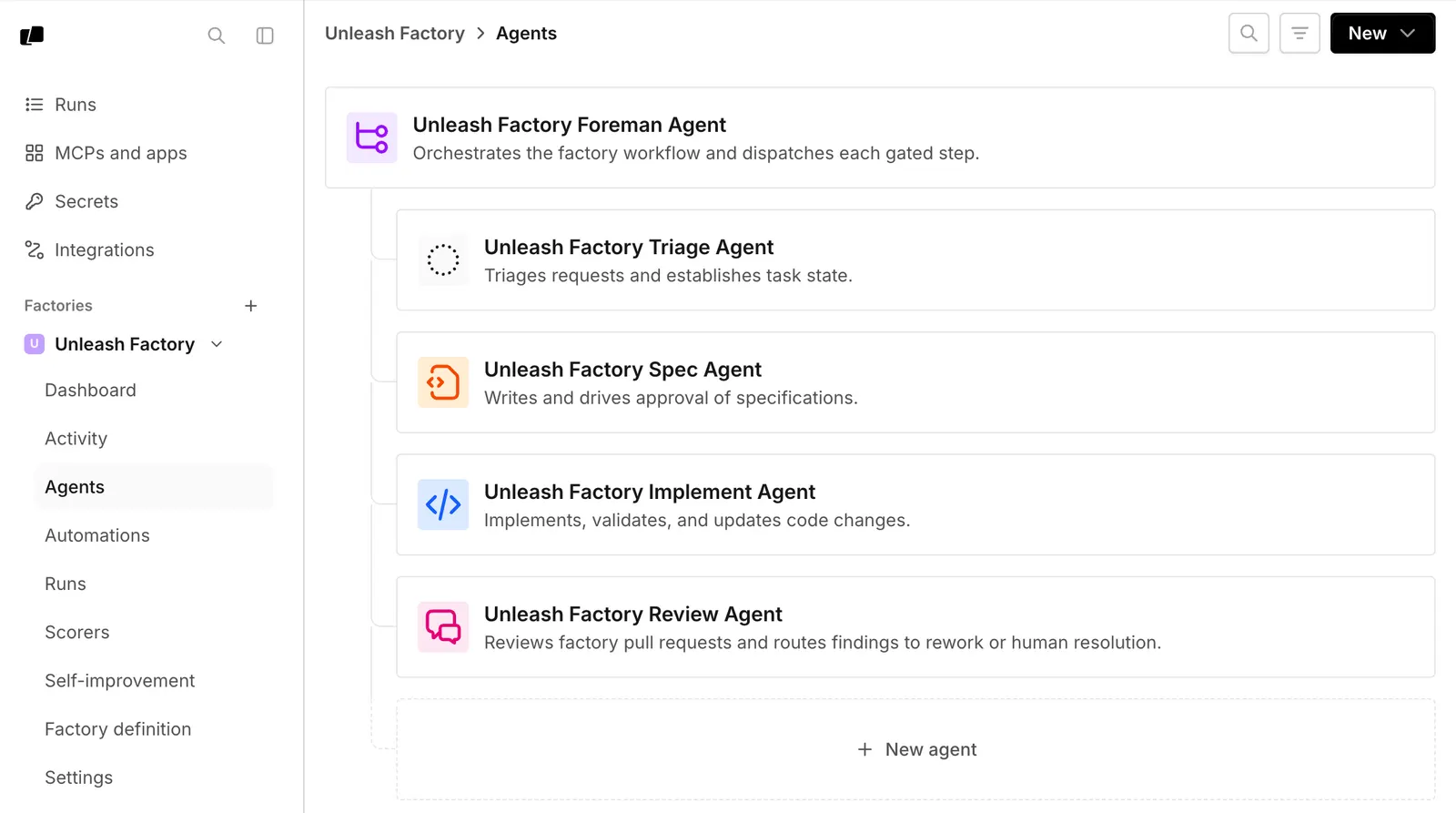
The Agents page lists a factory's foreman and default agents.
Click an agent to open its settings page. From here, you can edit the agent description, harness, model, runner, host, MCP servers, secrets, and instructions.
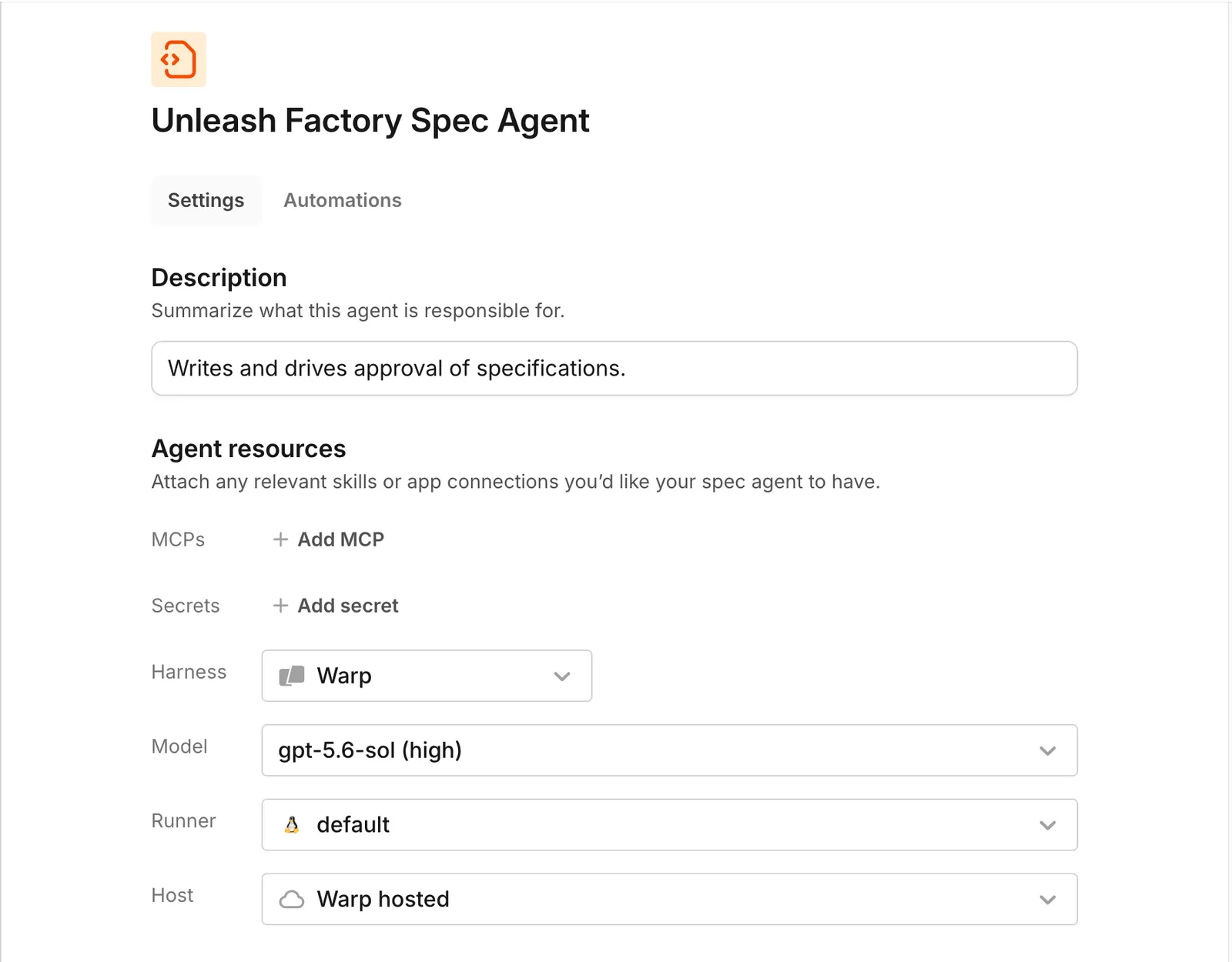
An agent's settings page, where you configure its model, harness, runner, and host.
You can also manage the factory as version-controlled code with factory definition files in a Git repository. A factory's settings live in one of two places:
A Warp-managed factory lets you edit everything, including harness, auth, and credential strategy, from the dashboard.
A GitHub-backed factory keeps those settings in its definition files. The dashboard shows them read-only, and you edit the files to make changes.
Factory setup doesn't choose models for you. To change the model an agent uses, edit that agent.
Choose models and harnesses per agent
Each agent can run on its own model and harness. Supported harnesses include the Warp Agent harness, Claude Code, and Codex, and any agent can use any of them. A foreman running on Claude Code or Codex can still dispatch the factory's other agents, and the runs it starts are still tracked as its children.
Third-party harnesses require a paid plan; on the Free plan every agent runs on the Warp Agent harness. See Warp pricing for what each plan includes.
Default model IDs change over time, so choose based on what each agent has to do well:
Agent
What to optimize for
Foreman
Orchestration, instruction following, and long-running conversations
Triage
Research, evidence gathering, and working with connected tools
Spec
Synthesizing requirements, technical reasoning, and precise writing
Implement
Coding strength, with a harness that fits your repositories and toolchain
Review
A different model or harness from the implement agent, so the two don't share blind spots
Change an agent's harness to Claude Code or Codex to run it with that provider's own coding tool instead of the Warp Agent.
From the factory dashboard sidebar, select your factory and click Agents.
Click an agent to open its settings page. In the "Harness" dropdown, select Claude Code or Codex.
In the Auth field, choose a compatible, team-owned secret from the list or click New auth secret to create one.
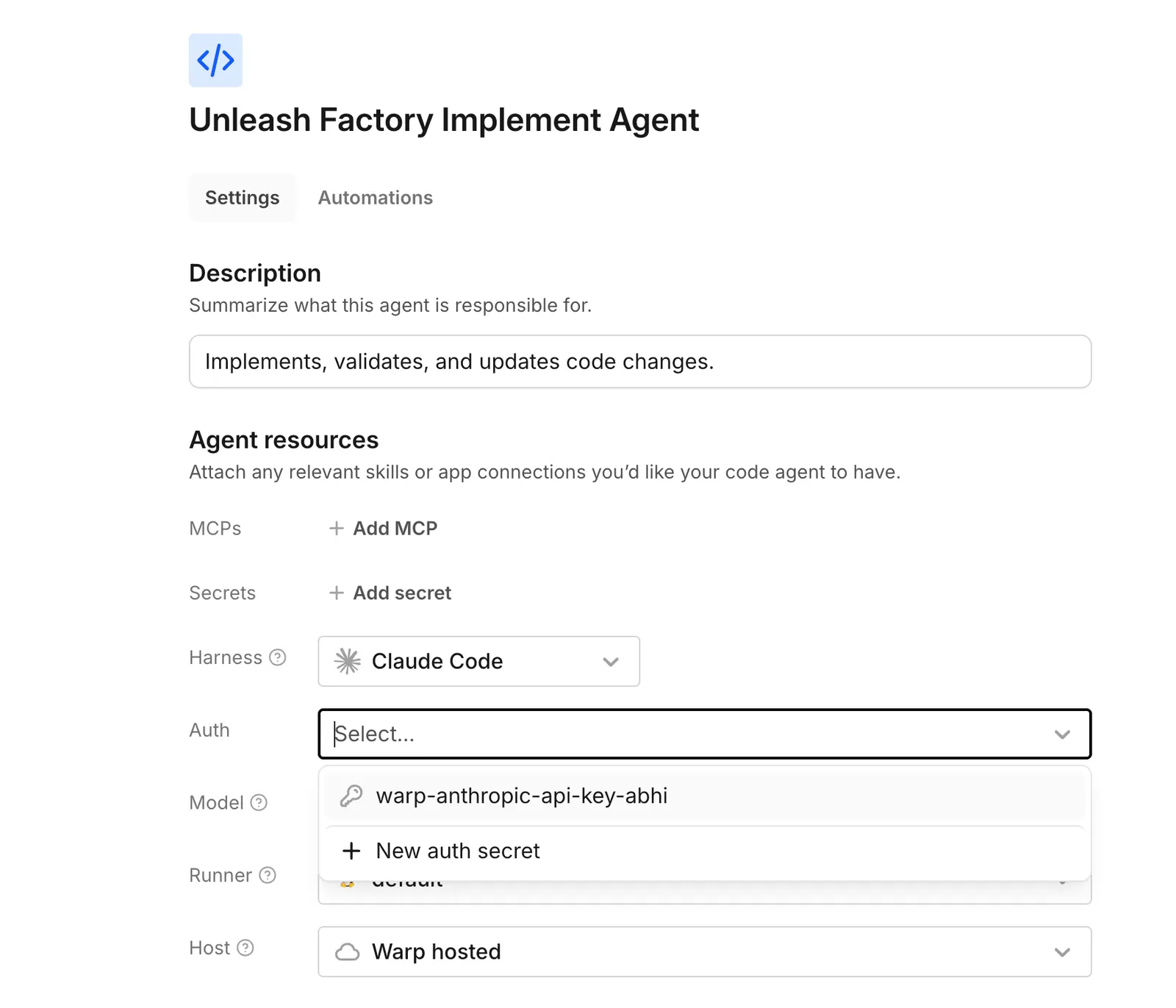
The Auth field's dropdown, showing a team-owned secret and the option to add a new one.
Claude Code accepts an Anthropic API key, Anthropic Bedrock API key, or Anthropic Bedrock access key.
Add a custom agent for a role that needs separate instructions, configuration, and runs.
For a Warp-managed factory, open Agents in the factory dashboard, click New, then click Custom agent. For a GitHub-backed factory, add agents/<name>/agent.md. See the agent.md configuration keys.
Custom agents have no built-in skills. Add factory skills based on who needs them:
One agent - Put the skill under agents/<name>/skills/.
Every agent - Put the skill under skills/.
Choose a configured factory agent
Use run_agents when the foreman should give work to one of the agents configured in your factory. The foreman receives a list of those agents, with a unique ID (UID) for each one.
Run the child remotely by setting the call's remote field, then copy the chosen agent's UID into agent_run_configs[].agent_identity_uid. Only use UIDs from the list, and select an agent for every child in the call. The name field only labels the child run; it doesn't choose the factory agent.
Warp uses the UID to load that agent's configured environment, runner, host, harness, and model unless the call overrides them. To start a child without factory configuration, use multi-agent orchestration from any Warp conversation.
Automations start a chosen agent on a schedule or when an event fires. They're one more way for work to enter your factory; the foreman still coordinates whatever they start. For all the ways to route work into a factory, see connect your factory.
Human decision points and permissions
Decision
Default behavior
What enforces it
Spec approval
The foreman asks a human to clarify ambiguity and approve every spec
Workflow policy in the foreman's instructions, which your team can change
Merging
Agents never merge; the foreman hands the finished pull request to a human
Your repository's permissions decide who can approve and merge
Runtime access
Each agent reaches only the repositories, secrets, and MCP servers in its configuration
Platform configuration and the permissions of the connected providers
The first two rows are conventions: they live in the foreman's instructions and your repository settings, and your team can change them. Access is different. What an agent can reach comes from its configuration and the permissions of the connected providers, never from its instructions — changing what an agent is told to do doesn't change what it's able to do.
So enforce with the real controls: branch protection and repository permissions decide who merges, and each agent's configuration decides what it can reach.