Search docs, agents, posts, Skills and MCP servers
carbon
Open-source manufacturing ERP, MES and QMS. Quoting, MRP, inventory, shop floor, quality and lot/serial traceability on one Postgres schema, with a REST API and MCP server. Self-host or use Carbon Cloud.
Manufacturing teams often run planning, production, quality and accounting in separate systems. That creates predictable problems:
BOMs and revisions are re-keyed between engineering and production
Material shortages surface after work has started
Job costs and quality records are reconstructed after the fact
Integrations depend on vendor-specific tools and consultants
Carbon puts ERP, MRP, MES and QMS in one Postgres database you can inspect, own and extend. Engineering, planning, production, quality and accounting update the same data, without synchronization jobs between separate product databases.
Generated types shared by the database, application and API
Postgres row-level security and tenant-scoped records
Role- and attribute-based access for employees, customers and suppliers
Realtime database subscriptions
Shared identity and permissions across the application, API and MCP server
Explicit dependency graphs for manufacturing operations
Rust geometry services for STEP conversion and assembly motion planning
Get Carbon
Carbon Cloud
Managed application, database, updates and backups. Start a 30-day trial without a sales call.
Self-hosted
Run Carbon in your VPC, on-prem or air-gapped. See the self-hosting guide.
Develop locally
Run the application and supporting services from source. Follow Local Development.
API & MCP
The Carbon API exposes the same manufacturing operations used by the application. Each operation validates its input, updates dependent records and enforces the authenticated identity's permissions. Operations are available through two interfaces with the same arguments:
Self-hosted deployments serve the same API at /api/v1. The Data API provides direct access to permitted tables and views when an operation is not available in the service layer.
API keys and MCP are included with Business and Enterprise plans. Using them in a self-hosted deployment requires a commercial license.
Architecture
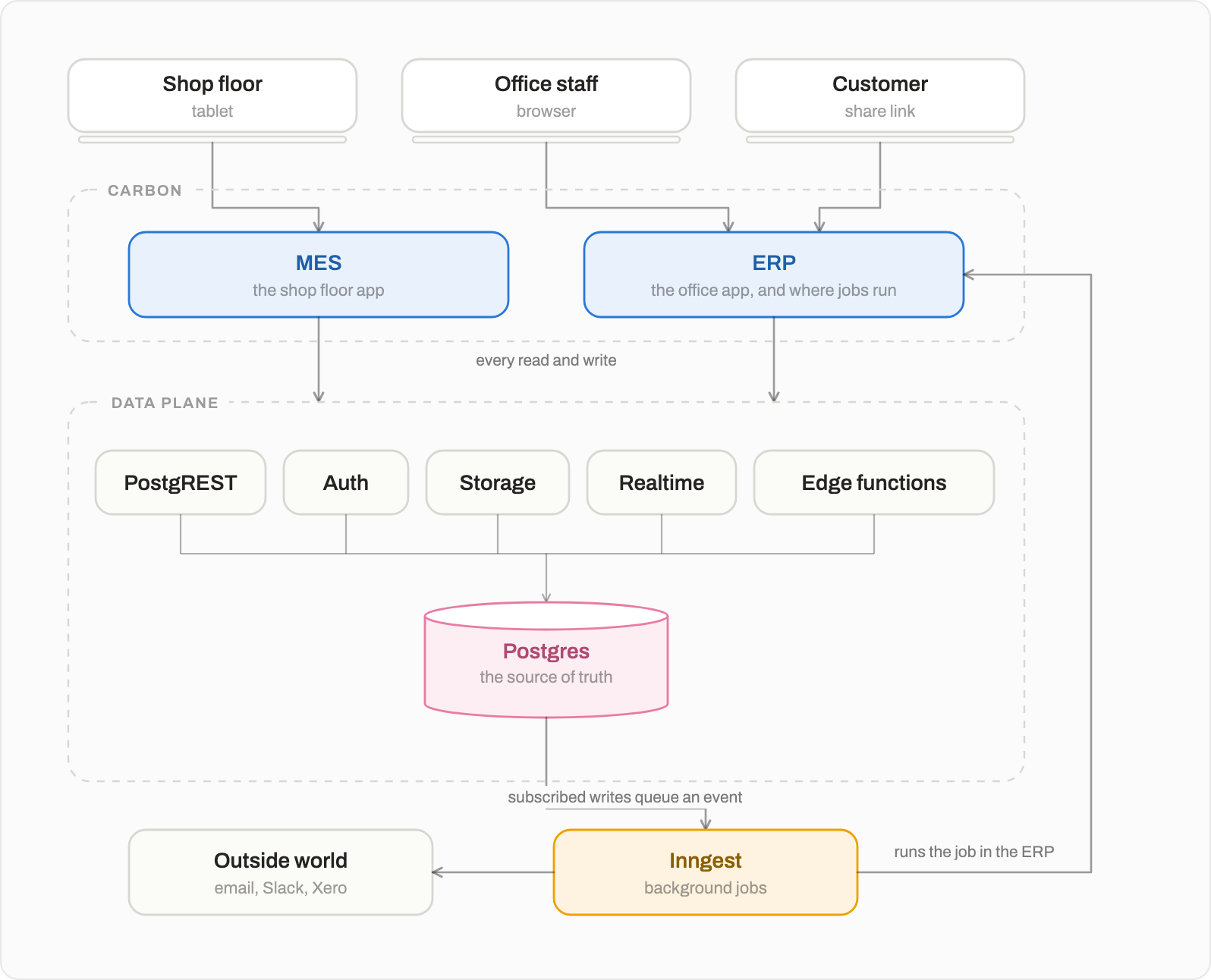
ERP and MES are React Router apps over a single Postgres database. Permissions (row-level security), computed totals and change events live in the database itself; background work runs through Inngest, which calls back into the ERP to execute jobs. The architecture guide follows one click all the way down.
Pure shared utilities (dates, precision, BOM, formatting)
@carbon/stripe
Stripe billing (Carbon Cloud only)
@carbon/ee
Enterprise features and integrations (commercial license)
@carbon/checks
Conformance checks that keep the codebase consistent
@carbon/dev
The crbn dev CLI: worktrees, Docker stacks, dev URLs
@carbon/harness
Harness for AI coding agents working on this repo
@carbon/config
Shared Vitest, TypeScript and Tailwind configuration
Local Development
Prerequisites:Docker, Node.js 22 and pnpm (via Corepack). On Windows, use WSL or Git Bash.
git clone https://github.com/crbnos/carbon.git && cd carbon
corepack enable && pnpm install
cp .env.example .env
pnpm dev
pnpm dev boots the whole backend in Docker (Postgres, PostgREST, auth, storage, realtime, Inngest, Redis and a mail catcher), applies migrations, generates types and starts the apps:
Sign in as test@carbon.ms: the dev stack seeds that user and skips the magic link. To fill a company with a full demo story (items, BOMs, orders, jobs, inspections, journals), seed one of the industry datasets (satellite, robotics, precision, motor):
No external accounts are needed to run locally. Email, Google/Microsoft sign-in, Stripe, PostHog and AI providers are all optional and configured in .env; see environment variables.
Worktrees and the crbn CLI
pnpm dev is shorthand for crbn up --no-portless. Run source ./setup.sh once to put crbn on your PATH and you get a separate, isolated stack per git worktree, so several branches can run side by side, each on its own HTTPS .dev URLs via portless:
crbn checkout -b feat/my-thing   # new branch + worktree off HEAD
crbn up                          # boot this worktree's stack at erp.<branch>.dev
crbn checkout 760                # check out PR #760 into its own worktree
crbn status | down | reset       # ports and health, stop, wipe and reboot
assembler is a Rust service (STEP → GLB + assembly motion planning) over C++ FCL and OpenCASCADE. ERP/MES run fine without it — set it up only if you need the 3D /convert and /plan endpoints.
Toolchain + native build deps (macOS):
curl --proto '=https' --tlsv1.2 -sSf https://sh.rustup.rs | sh   # Rust, if not already installed
brew install fcl cmake ninja draco                               # collision libs (+ libccd/eigen/octomap), build tools, Draco mesh compression
On Linux, install the equivalents from your package manager: libfcl-dev libccd-dev libeigen3-dev liboctomap-dev libdraco-dev cmake ninja-build plus a C/C++ toolchain.
./setup.sh already installs Draco on macOS. If yours lives outside the Homebrew keg (/opt/homebrew/opt/draco on arm64), point draco-bridge's build at it with DRACO_PREFIX=/path/to/draco cargo build.
Build OCCT once — a patched static OpenCASCADE, cached in ~/.cache/carbon-occt. Slow (~15–30 min) but one-time per machine; re-running is a no-op once cached:
./apps/assembler/scripts/build-occt.sh
Build the service — seconds once OCCT is cached (build.rs finds it automatically):
cargo build --release -p assembler
crbn up spawns the binary when it's present. Verify it's up with curl -sf "$ASSEMBLER_SERVICE_URL/health" (the URL is in your worktree's .env.local) or by watching the asm | lines in the crbn up output. Without the binary the rest of the stack still runs — only /convert and /plan are unavailable.
Restoring a production snapshot
To restore a production database snapshot locally, use crbn restore. It handles both plain-text .backup and custom-format .dump archives, drops and rebuilds the public schema, realigns internal sequences, resets storage metadata, then applies any migrations the backup predates and regenerates types.
Export a backup of your production database with pg_dump.
It prompts before replacing the database. The stack must already be running (crbn up) — a restore rewrites the auth and storage schemas, which GoTrue and Storage build through their own migrations when those containers boot, so crbn restore refuses rather than restore into an uninitialized stack.
To also get local admin access, pass your production email — your account is upgraded to Admin in the companies it already belongs to and the password is reset locally:
crbn restore /path/to/backup.backup --admin-email you@example.com
# Optional: set a custom local password (default: localpass)
crbn restore /path/to/backup.backup --admin-email you@example.com --admin-password mypass
Useful flags: --no-scrub-emails keeps real addresses (see the warning below), --mode prod restores exactly as-is without localizing config/webhooks/integrations, --no-migrate / --no-regen skip the trailing steps, --yes skips the prompt.
Emails are scrubbed by default — every address is rewritten to @example.test (your --admin-email is preserved so you can still log in). If you pass --no-scrub-emails, real production addresses will be present in the local DB; ensure local email sending is disabled or pointed at a sandbox (e.g. Mailpit) before triggering any email flows.
Note:storage.objects is truncated by default, so a restore does not populate local file storage — kept rows would reference files that only exist in the source environment's backend. Pass --keep-storage-objects to retain the metadata (and the backup's buckets) anyway; downloads will still 404, but the rows are there for work that needs realistic storage volume.
The underlying script, scripts/restore-database.sh, can still be invoked directly — it takes the same options as environment variables (SCRUB_EMAILS, ADMIN_EMAIL, ADMIN_PASSWORD, RESTORE_MODE), but note it defaults to not scrubbing emails and leaves the trailing pnpm db:migrate / pnpm db:types to you.
Commands
Command
Description
pnpm dev
Boot the stack and apps on localhost
pnpm db:migrate:new <name>
Create a database migration
pnpm db:migrate
Apply pending migrations
pnpm generate:types
Regenerate database types after a migration
pnpm db:seed:dev -- --dataset <key>
Seed a demo company
pnpm lint / pnpm test
Biome lint / unit tests
pnpm exec turbo run typecheck --filter=<pkg>
Typecheck one package
pnpm --filter <pkg> <cmd>
Run a command in one workspace
This project uses Biome for formatting and linting; install the VS Code extension for format-on-save.
Security
Found a vulnerability? Please email support@carbon.ms instead of opening a public issue. We respond within 3 business days and credit reporters once a fix ships. The full policy is in SECURITY.md.
Security is enforced by the database, not left to application code:
Tenant isolation in Postgres. Every table is scoped to a company and guarded by row-level security, so a query can only see its own company's rows.
Granular permissions. Role-based access per module and action for employees, customers and suppliers, applied the same way in the app, the API and MCP.
Scoped API keys. Keys carry explicit permissions, are stored only as hashes and are rate limited per key.
Sign-in. Passkeys, SSO, and enforced two-factor authentication on the Business plan.
Audit log. A record of who changed what and when, on the Business plan.
Your perimeter. Deploy in your VPC, on-prem or air-gapped to keep CUI inside infrastructure you control while supporting ITAR and CMMC requirements.
Carbon is open core. Everything in this repository is licensed under AGPLv3, except the Enterprise files (packages/ee and any file whose name contains .ee.), which are under the Carbon Commercial License. See Licensing for what that means in practice.
It's like v0, but in your Cursor / Claude Code / Windsurf: search 10,000+ React/Tailwind components, generate new UI with AI, and publish your own — right from your editor. Magic MCP is now the 21st MCP; this package keeps old configs working. Setup: 21st.dev/mcp
The missing open-source Kubernetes UI with a built-in MCP server for AI agents. See what's broken, why, and what changed. Issues, Topology, event timeline, Helm, GitOps, live service traffic, and cluster audits - all in one Go binary.
🧩 MCP Gateway - A lightweight gateway service that instantly transforms existing MCP Servers and APIs into MCP servers with zero code changes. Features Docker deployment and management UI, requiring no infrastructure modifications.
A markdown editor — and the bridge to your LLM. Local-first, MIT, ~15 MB. Bundled MCP server lets Claude Code / Codex / Cursor drive your vault directly. 14 AI providers BYOK.
The AI-native CLI-first React component library. 160+ animated, accessible, production-ready components with MCP Server support for Cursor, Claude & GitHub Copilot. Copy-paste architecture — you own the code.









 21st-dev/magic-mcp6k