
 koala73/worldmonitor88k
World Monitor
Live markets, conflicts, country risk, chokepoints, energy, and China decision signals. 90 tools.
AI & agents

CAD MCP Server
CAD-MCP is an innovative CAD control service that allows controlling CAD software for drawing operations through natural language instructions. This project combines natural language processing and CAD automation technology, enabling users to create and modify CAD drawings through simple text commands without manually operating the CAD interface.
Version 2.0 is fully upgraded based on the latest MCP specification (FastMCP, structured output, tool annotations, progress notifications, Streamable HTTP), and adds 35 tools in total covering querying, editing, layers, drawing management, blocks, and command passthrough — forming a complete "draw → inspect → correct" feedback loop.
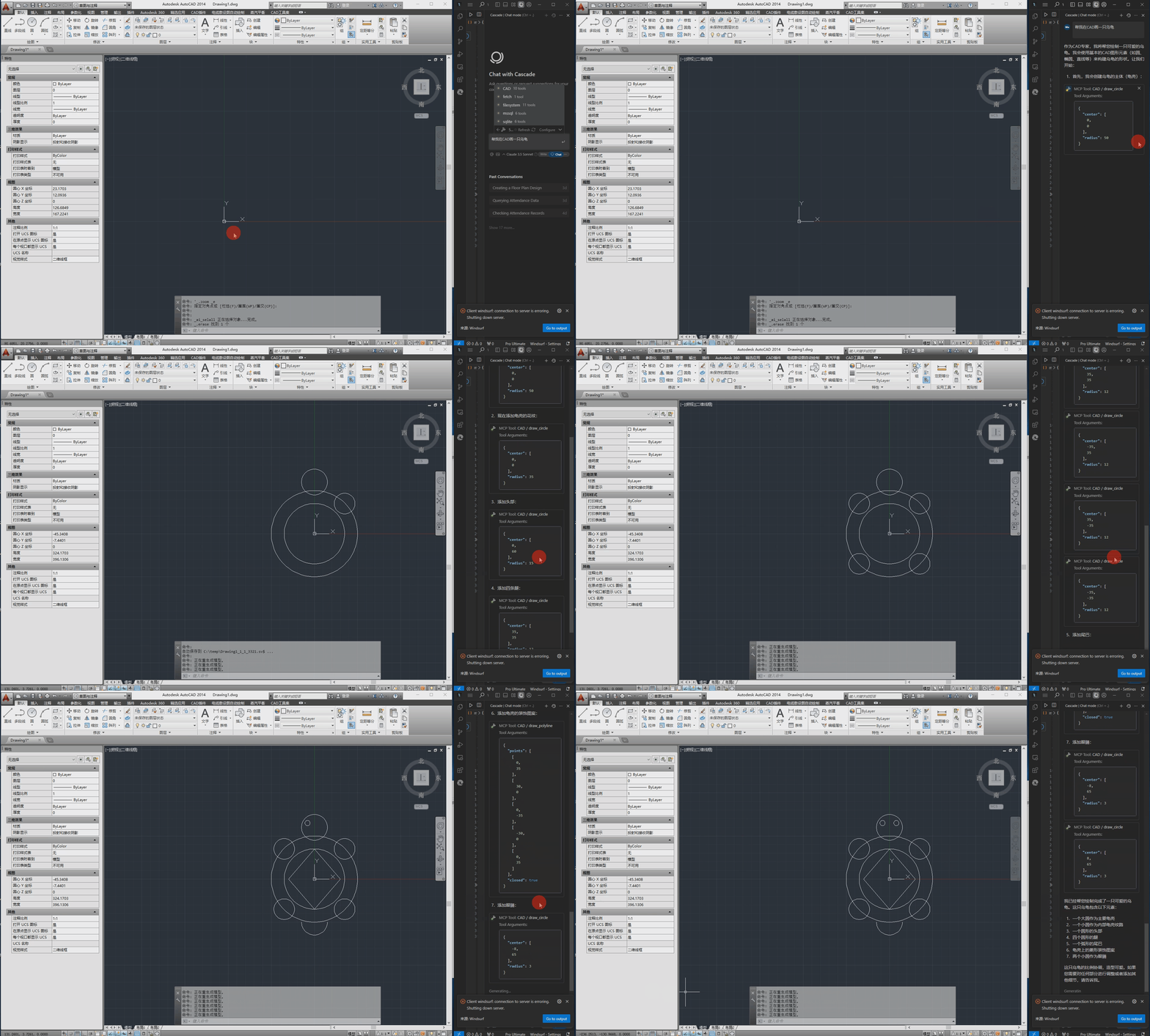
send_command (an escape hatch for everything else)structuredContent with an outputSchema that clients can parse directlyreadOnlyHint; destructive operations are marked destructiveHint for client confirmation policiesstdio (local, single client) and streamable-http (remote / multiple clients sharing one CAD instance)The following is the demo video.
pywin32>=306       # Windows COM interface support
mcp>=1.12,<2       # MCP Python SDK (FastMCP, structured output, Streamable HTTP)
pydantic>=2.0.0    # Data validation
Pillow>=10.0.0     # PNG encoding for screenshot previews
The configuration file is located at src/config.json and contains the following main settings:
{
    "server": {
        "name": "CAD MCP 服务器",
        "version": "2.0.0",
        "transport": "stdio",
        "host": "127.0.0.1",
        "port": 8000
    },
    "cad": {
        "type": "AUTOCAD",
        "startup_wait_time": 20,
        "command_delay": 0.5
    },
    "output": {
        "directory": "./output",
        "default_filename": "cad_drawing.dwg"
    }
}
transport: Transport mode, stdio (default, local single client) or streamable-http (remote / multi-client)host / port: Listen address and port for Streamable HTTP mode (can also be overridden via --host / --port command-line arguments)type: CAD software type (AutoCAD, GCAD, GstarCAD, or ZWCAD)startup_wait_time: CAD startup waiting time (seconds)command_delay: Command execution delay (seconds)# Option 1: Run directly (fully compatible with existing Claude/Cursor configs)
python src/server.py
# Option 2: Install as a CLI tool
pip install -e .
cad-mcp
# Option 3: Run with Streamable HTTP transport (remote / multi-client sharing one CAD instance)
python src/server.py --transport streamable-http --port 8000
# Clients connect to http://127.0.0.1:8000/mcp
The server uses stdio transport by default, so the same JSON config works for any MCP client (Claude Desktop, Cursor, Windsurf, TRAE, etc.). Add it to your client's MCP server config file (e.g. claude_desktop_config.json, Cursor's mcp.json), replacing the path with your own:
{
    "mcpServers": {
        "CAD": {
            "command": "python",
            "args": [
                # Your actual path, such as:"C:\\cad-mcp\\src\\server.py"
            ]
        }
    }
}
For Streamable HTTP mode, point the client to http://127.0.0.1:8000/mcp instead.
# Note: use your path
npx -y @modelcontextprotocol/inspector python C:\\cad-mcp\\src\\server.py
The server provides the following tools (35 in total):
Basic drawing:
draw_line: Draw a linedraw_circle: Draw a circledraw_arc: Draw an arcdraw_ellipse: Draw an ellipsedraw_polyline: Draw a polylinedraw_rectangle: Draw a rectangledraw_text: Add textdraw_hatch: Draw a hatch patternadd_dimension: Add linear dimensionQuery:
list_layers: List all layerslist_entities: List entities in model space (returns editable handles)get_entity_properties: Query detailed entity properties by handlescreenshot: Capture the CAD window to confirm drawing resultsEditing:
erase_entity / move_entity / rotate_entity / scale_entity: Erase / move / rotate / scale entitiescopy_entity / mirror_entity / offset_entity: Copy / mirror / offset entitiesarray_linear_entity / array_polar_entity: Linear / polar arraysundo / redo: Undo / redoLayer & drawing management:
create_layer / set_current_layer: Layer managementnew_drawing / open_drawing / close_drawing / save_drawing: Drawing managementcreate_block / insert_block / list_blocks: Block operationssend_command: Execute any CAD command via the command lineLegacy:
process_command: Process natural language commandsCAD-MCP/
├── imgs/ # Images and video resources
│ └── CAD-mcp.mp4 # Demo video
├── pyproject.toml # Packaging config (pip install -e .)
├── requirements.txt # Project dependencies
└── src/ # Source code
├── __init__.py # Package initialization
├── cad_controller.py # CAD controller (COM layer: drawing/query/editing/drawings/blocks)
├── config.py # Config singleton loader
├── config.json # Configuration file
├── models.py # Structured output models (outputSchema)
├── nlp_processor.py # Natural language processor
└── server.py # Server implementation (FastMCP)
MIT License
koala73/worldmonitor88kLive markets, conflicts, country risk, chokepoints, energy, and China decision signals. 90 tools.
AI & agents

 ahujasid/mcp-for-blender30k
Community plugin to control Blender 3D with any LLM of your choice. Not affiliated with the official Blender Foundation.
AI & agents

 oraios/serena30k
A powerful MCP toolkit for coding, providing semantic retrieval and editing capabilities - the IDE for your agent
AI & agents

 agentskills/agentskills26k
Search and discover Agent Skills from the skills.sh registry. Powered by HAPI MCP server.
AI & agents

 activepieces/activepieces25k
AI Agents & MCPs & AI Workflow Automation • (~400 MCP servers for AI agents) • AI Automation / AI Agent with MCPs • AI Workflows & AI Agents • MCPs for AI Agents
AI & agents

 czlonkowski/n8n-mcp23k
A MCP for Claude Desktop / Claude Code / Windsurf / Cursor to build n8n workflows for you
AI & agents