
 koala73/worldmonitor88k
World Monitor
Live markets, conflicts, country risk, chokepoints, energy, and China decision signals. 90 tools.
AI & agents

Generate dynamic Mermaid diagrams and charts with AI assistance. Customize styles and export diagr…
Add --scope user to use it in every project.
Remote server (http)
claude mcp add --transport http hustcc-mcp-mermaid https://server.smithery.ai/@hustcc/mcp-mermaid/mcp
 MCP Mermaid


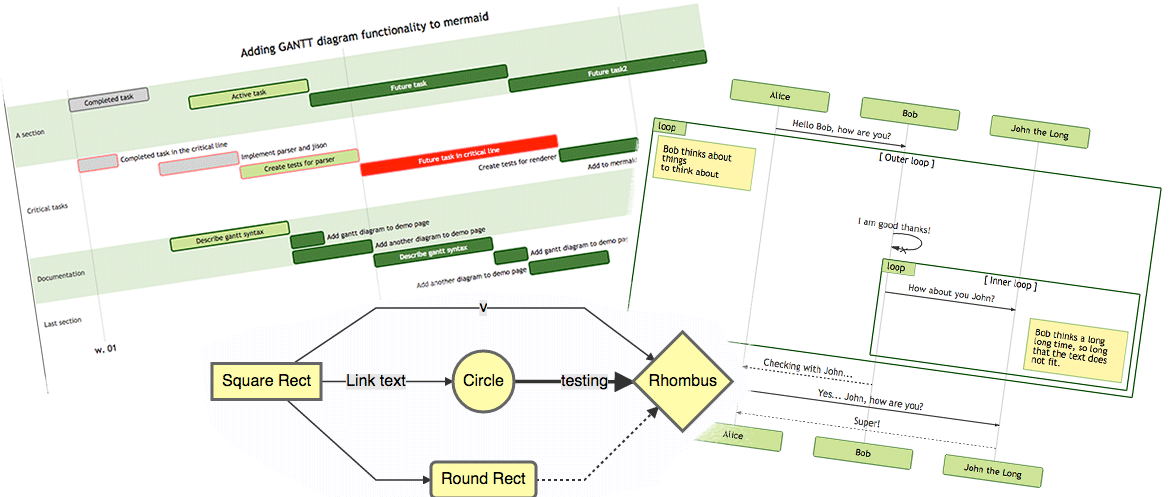
Generate mermaid diagram and chart with AI MCP dynamically. Also you can use:
 mcp-server-chart to generate chart, graph, map.
 Infographic to generate infographic, such as
 Timeline, Comparison, List, Process and so on.Fully support all features and syntax of Mermaid.
Support configuration of backgroundColor and theme, enabling large AI models to output rich style configurations.
Support exporting to base64, svg, mermaid, file, and remote-friendly svg_url, png_url formats, with validation for Mermaid to facilitate the model's multi-round output of correct syntax and graphics. Use outputType: "file" to automatically save PNG diagrams to disk for AI agents, or the URL modes to share diagrams through public mermaid.ink links.
To use with Desktop APP, such as Claude, VSCode, Cline, Cherry Studio, and so on, add the MCP server config below. On Mac system:
{
  "mcpServers": {
    "mcp-mermaid": {
      "command": "npx",
      "args": [
        "-y",
        "mcp-mermaid"
      ]
    }
  }
}
On Window system:
{
  "mcpServers": {
    "mcp-mermaid": {
      "command": "cmd",
      "args": [
        "/c",
        "npx",
        "-y",
        "mcp-mermaid"
      ]
    }
  }
}
Also, you can use it on aliyun, modelscope, glama.ai, smithery.ai or others with HTTP, SSE Protocol.
Access Points:
http://localhost:3033/ssehttp://localhost:1122/mcpAvailable Docker Tags:
susuperli/mcp-mermaid:latest - Latest stable versionInstall the package globally:
npm install -g mcp-mermaid
Run the server with your preferred transport option:
# For SSE transport (default endpoint: /sse)
mcp-mermaid -t sse

# For Streamable transport with custom endpoint
mcp-mermaid -t streamable
If you're working with the source code locally:
# Clone and setup
git clone https://github.com/hustcc/mcp-mermaid.git
cd mcp-mermaid
npm install
npm run build

# Run with npm scripts
npm run start:sse        # SSE transport on port 3033
npm run start:streamable # Streamable transport on port 1122
Then you can access the server at:
http://localhost:3033/ssehttp://localhost:1122/mcp (local) or http://localhost:3033/mcp (global)You can also use the following CLI options when running the MCP server. Command options by run cli with -h.
MCP Mermaid CLI

Options:
  --transport, -t  Specify the transport protocol: "stdio", "sse", or "streamable" (default: "stdio")
  --port, -p       Specify the port for SSE or streamable transport (default: 3033)
  --endpoint, -e   Specify the endpoint for the transport:
                    - For SSE: default is "/sse"
                    - For streamable: default is "/mcp"
  --help, -h       Show this help message
Install dependencies:
npm install
Build the server:
npm run build
Using MCP Inspector (for debugging):
npm run start
Using different transport protocols:
# SSE transport (Server-Sent Events)
npm run start:sse

# Streamable HTTP transport
npm run start:streamable
Direct node commands:
# SSE transport on port 3033
node build/index.js --transport sse --port 3033

# Streamable HTTP transport on port 1122
node build/index.js --transport streamable --port 1122

# STDIO transport (for MCP client integration)
node build/index.js --transport stdio
Run MCP Mermaid with Docker:
# Pull the image
docker pull susuperli/mcp-mermaid:latest

# Run with SSE transport (default)
docker run -p 3033:3033 susuperli/mcp-mermaid:latest --transport sse

# Run with streamable transport
docker run -p 1122:1122 susuperli/mcp-mermaid:latest --transport streamable --port 1122
MIT@hustcc.
koala73/worldmonitor88kLive markets, conflicts, country risk, chokepoints, energy, and China decision signals. 90 tools.
AI & agents

 ahujasid/mcp-for-blender30k
Community plugin to control Blender 3D with any LLM of your choice. Not affiliated with the official Blender Foundation.
AI & agents

 oraios/serena30k
A powerful MCP toolkit for coding, providing semantic retrieval and editing capabilities - the IDE for your agent
AI & agents

 agentskills/agentskills26k
Search and discover Agent Skills from the skills.sh registry. Powered by HAPI MCP server.
AI & agents

 activepieces/activepieces25k
AI Agents & MCPs & AI Workflow Automation • (~400 MCP servers for AI agents) • AI Automation / AI Agent with MCPs • AI Workflows & AI Agents • MCPs for AI Agents
AI & agents

 czlonkowski/n8n-mcp23k
A MCP for Claude Desktop / Claude Code / Windsurf / Cursor to build n8n workflows for you
AI & agents