
 github/github-mcp-server33k
搜索文档、Skill 和 MCP

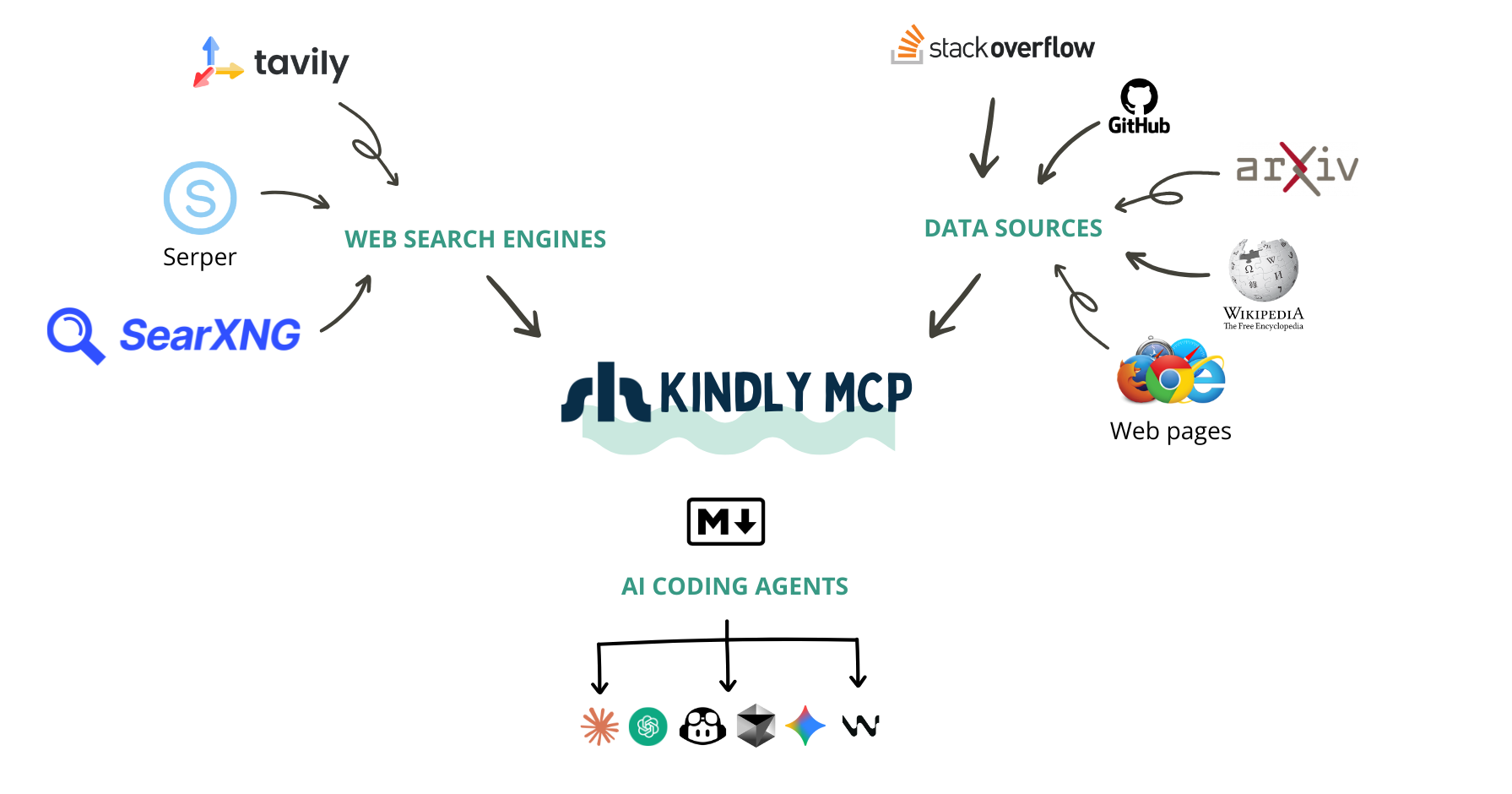
Kindly Web Search MCP Server: Web search + robust content retrieval for AI coding tools (Claude Code, Codex, Cursor, GitHub Copilot, Gemini, etc.) and AI agents (Claude Desktop, OpenClaw, Hermes, etc.). Supports Serper, Tavily, and SearXNG.
Web search + robust content retrieval for AI coding tools.
Kindly Web Search is a part of the Shelpuk AI Technology Consulting agentic suite – a set of tools that together improve the code quality produced by AI coding agents by 15–20%. Read more on Claude Code generation quality improvement.
Works with Claude Code, Codex, Antigravity, Cursor, Windsurf, and any agent that supports skills or MCP servers.
| Component | Role |
|---|---|
| tdd | Enforces TDD, requirements discipline, and peer review for every coding task |
| Serena | Semantic code navigation + persistent project memory |
| Kindly Web Search ← you are here | Up-to-date API and package documentation via web search |
| Lad MCP Server | Project-aware AI design and code review |
If you like what we're building, please ⭐ star this repo – it's a huge motivation for us to keep going!
1. Install three MCP servers and one skill:
2. Use the skill when requesting a feature:
Prompt your favorite AI coding agent (Claude Code, Codex, Cursor, etc.) as usual. Then just add Follow $tdd in the end.
> Build [your feature description]. Follow $tdd.
Picture this: You're debugging a cryptic error in Google Cloud Batch with GPU instances. Your AI coding assistant searches the web and finds the perfect StackOverflow thread. Great, right? Not quite. Here's what most web search MCP servers give your AI:
{
  "title": "GCP Cloud Batch fails with the GPU instance template",
  "url": "https://stackoverflow.com/questions/76546453/...",
  "snippet": "I am trying to run a GCP Cloud Batch job with K80 GPU. The job runs for ~30 min. and then fails..."
}
The question is there, but where are the answers? Where are the solutions that other developers tried? The workarounds? The "this worked for me" comments?
They're not there. Your AI now has to make a second call to scrape the page. Sometimes it does, sometimes it doesn't. And even when it does, most scrapers return either incomplete content or the entire webpage with navigation panels, ads, and other noise that wastes tokens and confuses the AI.
At Shelpuk AI Technology Consulting, we build custom AI products under a fixed-price model. Development efficiency isn't just nice to have - it's the foundation of our business. We've been using AI coding assistants since 2023 (GitHub Copilot, Cursor, Windsurf, Claude Code, Codex), and we noticed something frustrating:
When we developers face a complex bug, we don't just want to find a URL - we want to find the conversation. We want to see what others tried, what worked, what didn't, and why. We want the GitHub Issue with all the comments. We want the StackOverflow thread with upvoted answers and follow-up discussions. We want the arXiv paper content, not just its abstract.
Existing web search MCP servers are basically wrappers around search APIs. They're great at finding content, but terrible at delivering it in a way that's useful for AI coding assistants.
We built Kindly Web Search because we needed our AI assistants to work the way we work. When searching for solutions, Kindly:
✅ Integrates directly with APIs for StackExchange, GitHub Issues, arXiv, and Wikipedia - presenting content in LLM-optimized formats with proper structure
✅ Returns the full conversation in a single call: questions, answers, comments, reactions, and metadata
✅ Parses any webpage in real-time using a headless browser for cutting-edge issues that were literally posted yesterday
✅ Passes all useful content to the LLM immediately - no need for a second scraping call
✅ Supports multiple search providers (Serper, SerpBase, Tavily, SearXNG, Sofya, You.com, and Serply) with intelligent fallback
Now, when Claude Code or Codex searches for that GPU batch error, it gets the question and the answers. The code snippets. The "this fixed it for me" comments. Everything it needs to help you solve the problem - in one call.
If you give Kindly a try or like the idea, please drop us a star on GitHub - it’s always huge motivation for us to keep improving it! ⭐️
Kindly eliminates the need for:
✅ Generic web search MCP servers
✅ StackOverflow MCP servers
✅ Web scraping MCP servers (Playwright, Puppeteer, etc.)
It also significantly reduces reliance on GitHub MCP servers by providing structured Issue content through intelligent extraction.
Kindly has been our daily companion in production work for months, saving us countless hours and improving the effectiveness of our AI coding assistants. We're excited to share it with the community!
Tools
web_search(query, num_results=3) → top results with title, link, snippet, and page_content (Markdown, best-effort).get_content(url) → page_content (Markdown, best-effort).When extracting page content (get_content or web_search results), Kindly routes each URL through a priority chain of specialized handlers before falling back to the universal HTML loader:
| Priority | Target | Handler | HTTP client | Proxy support |
|---|---|---|---|---|
| 1 | StackExchange (StackOverflow, etc.) | StackExchange API | httpx[socks] | HTTP_PROXY / HTTPS_PROXY / ALL_PROXY (HTTP, SOCKS5) |
| 2 | GitHub Issues | GitHub GraphQL API | httpx[socks] | HTTP_PROXY / HTTPS_PROXY / ALL_PROXY (HTTP, SOCKS5) |
| 3 | GitHub Discussions | GitHub GraphQL API | httpx[socks] | HTTP_PROXY / HTTPS_PROXY / ALL_PROXY (HTTP, SOCKS5) |
| 4 | Wikipedia | MediaWiki Action API | httpx[socks] | HTTP_PROXY / HTTPS_PROXY / ALL_PROXY (HTTP, SOCKS5) |
| 5 | arXiv | Atom API + PDF → Markdown | httpx[socks] | HTTP_PROXY / HTTPS_PROXY / ALL_PROXY (HTTP, SOCKS5) |
| 6 | All other URLs | Universal HTML loader | headless Chromium (nodriver) | KINDLY_CHROME_PROXY (HTTP, SOCKS5, etc.) |
All httpx-based handlers read standard proxy environment variables (HTTP_PROXY, HTTPS_PROXY, ALL_PROXY) and support both HTTP and SOCKS proxy URLs via the socksio dependency. The universal HTML loader uses Chromium's --proxy-server flag via KINDLY_CHROME_PROXY, which supports SOCKS5 and other schemes natively.
Search uses Serper (primary, if configured), SerpBase, Tavily, SearXNG, Sofya, You.com, or Serply, and page extraction uses a local Chromium-based browser via nodriver.
Before launching the headless browser, the universal HTML loader first tries to fetch markdown directly with one cheap httpx GET — returning it immediately on a hit and falling back to the browser unchanged on any miss. Two independent probes:
| Probe | Env var | Default | Mechanism |
|---|---|---|---|
| Suffix | KINDLY_MARKDOWN_SUFFIX_HOSTS | help.aliyun.com,www.alibabacloud.com/help (on) | For listed hosts, request {path}.md — Aliyun docs serve text/markdown at that route. Add host or host/path-prefix entries for other {path}.md sites. |
| Accept | KINDLY_MARKDOWN_ACCEPT_PROBE | 0 (off) | Set to 1 to request every universal-path URL with Accept: text/markdown. Catches supporters automatically (Cloudflare, Microsoft Learn, AWS, GitHub, … per acceptmarkdown.com); on text/html the browser re-fetches (one extra request). |
Both probes validate the response (text/markdown, ≥1 KB, non-empty after sanitize) and apply the same output cap as the browser path, so the returned markdown is consistent across paths. See .env.example for the full entries.
SERPER_API_KEY (recommended) → SERPBASE_API_KEY (SerpBase, Google results) → TAVILY_API_KEY → SEARXNG_BASE_URL (self-hosted SearXNG) → SOFYA_API_KEY → YDC_API_KEY (You.com) → SERPLY_API_KEY (Serply) → APIFARE_TOKEN (apifare, prepaid balance)page_content extraction may fail for other sites.GITHUB_TOKEN (renders GitHub Issues in a much more LLM-friendly format: question + answers/comments + reactions/metadata; fewer rate limits)onnxruntime wheels may be unavailable).GITHUB_TOKEN can be read-only and limited to public repositories to avoid security/privacy concerns.
uvxmacOS / Linux:
curl -LsSf https://astral.sh/uv/install.sh | sh
Windows (PowerShell):
irm https://astral.sh/uv/install.ps1 | iex
Re-open your terminal and verify:
uvx --version
page_content)You need Chrome / Chromium / Edge / Brave installed on the same machine running your MCP client.
Note: If you skip this, specialized sources (StackOverflow/StackExchange, GitHub Issues/Discussions, Wikipedia, arXiv) will still work well. Only universal page_content extraction for arbitrary sites requires the browser.
macOS:
brew install --cask chromium
Windows:
Get-Command chrome | Select-Object -ExpandProperty Source
# Common path:
# C:\Program Files\Google\Chrome\Application\chrome.exe
# If `Get-Command chrome` fails, try one of these:
# C:\Program Files (x86)\Google\Chrome\Application\chrome.exe
# C:\Program Files\Microsoft\Edge\Application\msedge.exe
Linux (Ubuntu/Debian):
sudo apt-get update
sudo apt-get install -y chromium
which chromium
Other Linux distros: install chromium (or chromium-browser) via your package manager.
Set one of these. Provider selection order is: Serper → SerpBase → Tavily → SearXNG → Sofya → You.com → Serply.
macOS / Linux:
export SERPER_API_KEY="..."
# or:
export TAVILY_API_KEY="..."
# or (You.com, key at https://you.com/platform/api-keys):
export YDC_API_KEY="..."
# or (Serply, key at https://serply.io):
export SERPLY_API_KEY="..."
# or
export APIFARE_TOKEN="..."
# or (self-hosted SearXNG):
export SEARXNG_BASE_URL="https://searx.example.org"
Windows (PowerShell):
$env:SERPER_API_KEY="..."
# or:
$env:TAVILY_API_KEY="..."
# or (You.com, key at https://you.com/platform/api-keys):
$env:YDC_API_KEY="..."
# or (Serply, key at https://serply.io):
$env:SERPLY_API_KEY="..."
# or
$env:APIFARE_TOKEN="..."
# or (self-hosted SearXNG):
$env:SEARXNG_BASE_URL="https://searx.example.org"
Optional (SearXNG): if your instance requires authentication or blocks bots, set:
export SEARXNG_HEADERS_JSON='{"Authorization":"Bearer ..."}'
export SEARXNG_USER_AGENT="Mozilla/5.0 ..."
Windows (PowerShell):
$env:SEARXNG_HEADERS_JSON='{"Authorization":"Bearer ..."}'
$env:SEARXNG_USER_AGENT="Mozilla/5.0 ..."
Optional (recommended for better GitHub Issue / PR extraction):
export GITHUB_TOKEN="..."
For public repos, a read-only token is enough (classic tokens often use public_repo; fine-grained tokens need repo read access).
uvx --from git+https://github.com/Shelpuk-AI-Technology-Consulting/kindly-web-search-mcp-server \
  kindly-web-search-mcp-server start-mcp-server
First-run note: the first uvx invocation may take 30–60 seconds while it builds the tool environment. If your MCP client times out on first start, run the command once in a terminal to “prewarm” it, then retry in your client.
Now configure your MCP client to run that command. Make sure your API keys are set in the same shell/OS environment that launches the MCP client (unless you paste them directly into the client config).
Set one of SERPER_API_KEY, SERPBASE_API_KEY, TAVILY_API_KEY, SEARXNG_BASE_URL, SOFYA_API_KEY, YDC_API_KEY, SERPLY_API_KEY, or APIFARE_TOKEN.
CLI (no file editing) — add a local stdio MCP server:
macOS / Linux (Serper):
codex mcp add kindly-web-search \
  --env SERPER_API_KEY="$SERPER_API_KEY" \
  --env GITHUB_TOKEN="$GITHUB_TOKEN" \
  --env KINDLY_BROWSER_EXECUTABLE_PATH="$KINDLY_BROWSER_EXECUTABLE_PATH" \
  -- uvx --from git+https://github.com/Shelpuk-AI-Technology-Consulting/kindly-web-search-mcp-server \
  kindly-web-search-mcp-server start-mcp-server
macOS / Linux (Tavily):
codex mcp add kindly-web-search \
  --env TAVILY_API_KEY="$TAVILY_API_KEY" \
  --env GITHUB_TOKEN="$GITHUB_TOKEN" \
  --env KINDLY_BROWSER_EXECUTABLE_PATH="$KINDLY_BROWSER_EXECUTABLE_PATH" \
  -- uvx --from git+https://github.com/Shelpuk-AI-Technology-Consulting/kindly-web-search-mcp-server \
  kindly-web-search-mcp-server start-mcp-server
If you use SearXNG, replace the provider env var above with:
--env SEARXNG_BASE_URL="$SEARXNG_BASE_URL"
Windows (PowerShell):
codex mcp add kindly-web-search `
  --env SERPER_API_KEY="$env:SERPER_API_KEY" `
  --env GITHUB_TOKEN="$env:GITHUB_TOKEN" `
  --env KINDLY_BROWSER_EXECUTABLE_PATH="$env:KINDLY_BROWSER_EXECUTABLE_PATH" `
  -- uvx --from git+https://github.com/Shelpuk-AI-Technology-Consulting/kindly-web-search-mcp-server `
  kindly-web-search-mcp-server start-mcp-server
Windows (PowerShell, Tavily):
codex mcp add kindly-web-search `
  --env TAVILY_API_KEY="$env:TAVILY_API_KEY" `
  --env GITHUB_TOKEN="$env:GITHUB_TOKEN" `
  --env KINDLY_BROWSER_EXECUTABLE_PATH="$env:KINDLY_BROWSER_EXECUTABLE_PATH" `
  -- uvx --from git+https://github.com/Shelpuk-AI-Technology-Consulting/kindly-web-search-mcp-server `
  kindly-web-search-mcp-server start-mcp-server
Alternative (file-based):
Edit ~/.codex/config.toml:
[mcp_servers.kindly-web-search]
command = "uvx"
args = [
  "--from",
  "git+https://github.com/Shelpuk-AI-Technology-Consulting/kindly-web-search-mcp-server",
  "kindly-web-search-mcp-server",
  "start-mcp-server",
]
# Forward variables from your shell/OS environment:
env_vars = ["SERPER_API_KEY", "SERPBASE_API_KEY", "TAVILY_API_KEY", "SEARXNG_BASE_URL", "SOFYA_API_KEY", "YDC_API_KEY", "SERPLY_API_KEY", "APIFARE_TOKEN", "GITHUB_TOKEN", "KINDLY_BROWSER_EXECUTABLE_PATH"]
startup_timeout_sec = 120.0
Set one of SERPER_API_KEY, SERPBASE_API_KEY, TAVILY_API_KEY, SEARXNG_BASE_URL, SOFYA_API_KEY, YDC_API_KEY, SERPLY_API_KEY, or APIFARE_TOKEN.
CLI (no file editing) — add a local stdio MCP server:
macOS / Linux (Serper):
claude mcp add --transport stdio kindly-web-search \
  -e SERPER_API_KEY="$SERPER_API_KEY" \
  -e GITHUB_TOKEN="$GITHUB_TOKEN" \
  -e KINDLY_BROWSER_EXECUTABLE_PATH="$KINDLY_BROWSER_EXECUTABLE_PATH" \
  -- uvx --from git+https://github.com/Shelpuk-AI-Technology-Consulting/kindly-web-search-mcp-server \
  kindly-web-search-mcp-server start-mcp-server
macOS / Linux (Tavily):
claude mcp add --transport stdio kindly-web-search \
  -e TAVILY_API_KEY="$TAVILY_API_KEY" \
  -e GITHUB_TOKEN="$GITHUB_TOKEN" \
  -e KINDLY_BROWSER_EXECUTABLE_PATH="$KINDLY_BROWSER_EXECUTABLE_PATH" \
  -- uvx --from git+https://github.com/Shelpuk-AI-Technology-Consulting/kindly-web-search-mcp-server \
  kindly-web-search-mcp-server start-mcp-server
If you use SearXNG, replace the provider env var above with:
-e SEARXNG_BASE_URL="$SEARXNG_BASE_URL"
Windows (PowerShell):
claude mcp add --transport stdio kindly-web-search `
  -e SERPER_API_KEY="$env:SERPER_API_KEY" `
  -e GITHUB_TOKEN="$env:GITHUB_TOKEN" `
  -e KINDLY_BROWSER_EXECUTABLE_PATH="$env:KINDLY_BROWSER_EXECUTABLE_PATH" `
  -- uvx --from git+https://github.com/Shelpuk-AI-Technology-Consulting/kindly-web-search-mcp-server `
  kindly-web-search-mcp-server start-mcp-server
Windows (PowerShell, Tavily):
claude mcp add --transport stdio kindly-web-search `
  -e TAVILY_API_KEY="$env:TAVILY_API_KEY" `
  -e GITHUB_TOKEN="$env:GITHUB_TOKEN" `
  -e KINDLY_BROWSER_EXECUTABLE_PATH="$env:KINDLY_BROWSER_EXECUTABLE_PATH" `
  -- uvx --from git+https://github.com/Shelpuk-AI-Technology-Consulting/kindly-web-search-mcp-server `
  kindly-web-search-mcp-server start-mcp-server
Note: On current Claude Code versions, keep the server name immediately after --transport stdio and before -e/--env flags. Tested with Claude Code 2.0.76.
If Claude Code times out while starting the server, set a 120s startup timeout (milliseconds):
macOS / Linux:
export MCP_TIMEOUT=120000
Windows (PowerShell):
$env:MCP_TIMEOUT="120000"
Alternative (file-based):
Create/edit .mcp.json (project scope; recommended for teams):
{
  "mcpServers": {
    "kindly-web-search": {
      "command": "uvx",
      "args": [
        "--from",
        "git+https://github.com/Shelpuk-AI-Technology-Consulting/kindly-web-search-mcp-server",
        "kindly-web-search-mcp-server",
        "start-mcp-server"
      ],
      "env": {
        "SERPER_API_KEY": "${SERPER_API_KEY}",
        "TAVILY_API_KEY": "${TAVILY_API_KEY}",
        "SEARXNG_BASE_URL": "${SEARXNG_BASE_URL}",
        "GITHUB_TOKEN": "${GITHUB_TOKEN}",
        "KINDLY_BROWSER_EXECUTABLE_PATH": "${KINDLY_BROWSER_EXECUTABLE_PATH}"
      }
    }
  }
}
Set one of SERPER_API_KEY, SERPBASE_API_KEY, TAVILY_API_KEY, SEARXNG_BASE_URL, SOFYA_API_KEY, YDC_API_KEY, SERPLY_API_KEY, or APIFARE_TOKEN.
Edit ~/.gemini/settings.json (or .gemini/settings.json in a project):
{
  "mcpServers": {
    "kindly-web-search": {
      "command": "uvx",
      "args": [
        "--from",
        "git+https://github.com/Shelpuk-AI-Technology-Consulting/kindly-web-search-mcp-server",
        "kindly-web-search-mcp-server",
        "start-mcp-server"
      ],
      "env": {
        "SERPER_API_KEY": "$SERPER_API_KEY",
        "TAVILY_API_KEY": "$TAVILY_API_KEY",
        "SEARXNG_BASE_URL": "$SEARXNG_BASE_URL",
        "GITHUB_TOKEN": "$GITHUB_TOKEN",
        "KINDLY_BROWSER_EXECUTABLE_PATH": "$KINDLY_BROWSER_EXECUTABLE_PATH"
      },
      "timeout": 120000
    }
  }
}
Set one of SERPER_API_KEY, SERPBASE_API_KEY, TAVILY_API_KEY, SEARXNG_BASE_URL, SOFYA_API_KEY, YDC_API_KEY, SERPLY_API_KEY, or APIFARE_TOKEN.
If mcporter is not installed yet: npm i -g mcporter.
mcporter docs: https://github.com/steipete/mcporter/blob/main/docs/config.md
CLI (no file editing) — mcporter (recommended):
# Replace `$...` vars with real values, or export them in your shell first.
mcporter config add kindly-search \
  --scope home \
  --command "uvx --from git+https://github.com/Shelpuk-AI-Technology-Consulting/kindly-web-search-mcp-server kindly-web-search-mcp-server start-mcp-server" \
  --env SERPER_API_KEY="$SERPER_API_KEY" \
  --env TAVILY_API_KEY="$TAVILY_API_KEY" \
  --env SEARXNG_BASE_URL="$SEARXNG_BASE_URL" \
  --env GITHUB_TOKEN="$GITHUB_TOKEN" \
  --env KINDLY_BROWSER_EXECUTABLE_PATH="$KINDLY_BROWSER_EXECUTABLE_PATH"
This writes to ~/.mcporter/mcporter.json (--scope home).
You can replace kindly-search with any server name you prefer.
Verify:
mcporter config get kindly-search
Alternative (file-based):
Edit mcporter config (~/.mcporter/mcporter.json, or config/mcporter.json if you use project scope) and add this under mcpServers:
{
  "mcpServers": {
    "kindly-search": {
      "command": "uvx",
      "args": [
        "--from",
        "git+https://github.com/Shelpuk-AI-Technology-Consulting/kindly-web-search-mcp-server",
        "kindly-web-search-mcp-server",
        "start-mcp-server"
      ],
      "env": {
        "SERPER_API_KEY": "PASTE_SERPER_KEY_OR_LEAVE_EMPTY",
        "TAVILY_API_KEY": "PASTE_TAVILY_KEY_OR_LEAVE_EMPTY",
        "SEARXNG_BASE_URL": "PASTE_SEARXNG_URL_OR_LEAVE_EMPTY",
        "GITHUB_TOKEN": "PASTE_GITHUB_TOKEN_OR_LEAVE_EMPTY",
        "KINDLY_BROWSER_EXECUTABLE_PATH": "PASTE_IF_NEEDED"
      }
    }
  }
}
Do not add root-level mcpServers to ~/.openclaw/openclaw.json (OpenClaw config uses strict schema validation and unknown keys are rejected).
If OpenClaw is already running and doesn’t pick up the new server, restart/reload the gateway:
openclaw gateway restart
Set one of SERPER_API_KEY, SERPBASE_API_KEY, TAVILY_API_KEY, SEARXNG_BASE_URL, SOFYA_API_KEY, YDC_API_KEY, SERPLY_API_KEY, or APIFARE_TOKEN.
In Antigravity, open the MCP store, then:
mcp_config.json)mcpServers, save, then go back and click RefreshPaste this into your mcpServers object (don’t overwrite other servers):
{
  "kindly-web-search": {
    "command": "uvx",
    "args": [
      "--from",
      "git+https://github.com/Shelpuk-AI-Technology-Consulting/kindly-web-search-mcp-server",
      "kindly-web-search-mcp-server",
      "start-mcp-server"
    ],
    "env": {
      "SERPER_API_KEY": "PASTE_SERPER_KEY_OR_LEAVE_EMPTY",
      "TAVILY_API_KEY": "PASTE_TAVILY_KEY_OR_LEAVE_EMPTY",
      "SEARXNG_BASE_URL": "PASTE_SEARXNG_URL_OR_LEAVE_EMPTY",
      "GITHUB_TOKEN": "PASTE_GITHUB_TOKEN_OR_LEAVE_EMPTY",
      "KINDLY_BROWSER_EXECUTABLE_PATH": "PASTE_IF_NEEDED"
    }
  }
}
If Antigravity can’t find uvx, replace "uvx" with the absolute path (which uvx on macOS/Linux, where uvx on Windows).
Make sure at least one of SERPER_API_KEY / SERPBASE_API_KEY / TAVILY_API_KEY / SEARXNG_BASE_URL / SOFYA_API_KEY / YDC_API_KEY / SERPLY_API_KEY / APIFARE_TOKEN is non-empty.
If the first start is slow, run the uvx command from Quickstart once in a terminal to prebuild the environment, then click Refresh.
Don’t commit/share mcp_config.json if it contains API keys.
Set one of SERPER_API_KEY, SERPBASE_API_KEY, TAVILY_API_KEY, SEARXNG_BASE_URL, SOFYA_API_KEY, YDC_API_KEY, SERPLY_API_KEY, or APIFARE_TOKEN.
Startup timeout: Cursor does not currently expose a per-server startup timeout setting. If the first run is slow, run the uvx command from Quickstart once in a terminal to prebuild the tool environment, then restart Cursor.
Create .cursor/mcp.json:
{
  "mcpServers": {
    "kindly-web-search": {
      "type": "stdio",
      "command": "uvx",
      "args": [
        "--from",
        "git+https://github.com/Shelpuk-AI-Technology-Consulting/kindly-web-search-mcp-server",
        "kindly-web-search-mcp-server",
        "start-mcp-server"
      ],
      "env": {
        "SERPER_API_KEY": "${env:SERPER_API_KEY}",
        "TAVILY_API_KEY": "${env:TAVILY_API_KEY}",
        "SEARXNG_BASE_URL": "${env:SEARXNG_BASE_URL}",
        "GITHUB_TOKEN": "${env:GITHUB_TOKEN}",
        "KINDLY_BROWSER_EXECUTABLE_PATH": "${env:KINDLY_BROWSER_EXECUTABLE_PATH}"
      }
    }
  }
}
Edit claude_desktop_config.json:
~/Library/Application Support/Claude/claude_desktop_config.json%APPDATA%\\Claude\\claude_desktop_config.jsonNote: values in this file are literal strings. Don’t commit this file or share it.
Startup timeout: Claude Desktop does not expose a per-server startup timeout setting. If the first run is slow, run the uvx command from Quickstart once in a terminal to prebuild the tool environment, then restart Claude Desktop.
{
  "mcpServers": {
    "kindly-web-search": {
      "command": "uvx",
      "args": [
        "--from",
        "git+https://github.com/Shelpuk-AI-Technology-Consulting/kindly-web-search-mcp-server",
        "kindly-web-search-mcp-server",
        "start-mcp-server"
      ],
      "env": {
        "SERPER_API_KEY": "PASTE_SERPER_KEY_OR_LEAVE_EMPTY",
        "TAVILY_API_KEY": "PASTE_TAVILY_KEY_OR_LEAVE_EMPTY",
        "SEARXNG_BASE_URL": "PASTE_SEARXNG_URL_OR_LEAVE_EMPTY",
        "GITHUB_TOKEN": "PASTE_GITHUB_TOKEN_OR_LEAVE_EMPTY",
        "KINDLY_BROWSER_EXECUTABLE_PATH": "PASTE_IF_NEEDED"
      }
    }
  }
}
Most secure option: uses interactive prompts, so secrets don’t need to be stored in the file.
Startup timeout: VS Code currently does not expose a per-server startup timeout setting for MCP servers. If the first run is slow, run the uvx command from Quickstart once in a terminal to prebuild the tool environment, then restart VS Code.
Create .vscode/mcp.json:
{
  "servers": {
    "kindly-web-search": {
      "type": "stdio",
      "command": "uvx",
      "args": [
        "--from",
        "git+https://github.com/Shelpuk-AI-Technology-Consulting/kindly-web-search-mcp-server",
        "kindly-web-search-mcp-server",
        "start-mcp-server"
      ],
      "env": {
        "SERPER_API_KEY": "${input:serper-api-key}",
        "TAVILY_API_KEY": "${input:tavily-api-key}",
        "SEARXNG_BASE_URL": "${input:searxng-base-url}",
        "GITHUB_TOKEN": "${input:github-token}",
        "KINDLY_BROWSER_EXECUTABLE_PATH": "${input:browser-path}"
      }
    }
  },
  "inputs": [
    { "id": "serper-api-key", "type": "promptString", "description": "Serper API key (optional if using Tavily or SearXNG)" },
    { "id": "tavily-api-key", "type": "promptString", "description": "Tavily API key (optional if using Serper or SearXNG)" },
    { "id": "searxng-base-url", "type": "promptString", "description": "SearXNG base URL (optional if using Serper or Tavily)" },
    { "id": "github-token", "type": "promptString", "description": "GitHub token (recommended)" },
    { "id": "browser-path", "type": "promptString", "description": "Browser binary path (only if needed)" }
  ]
}
Set KINDLY_BROWSER_EXECUTABLE_PATH to your browser binary.
macOS (Google Chrome):
export KINDLY_BROWSER_EXECUTABLE_PATH="/Applications/Google Chrome.app/Contents/MacOS/Google Chrome"
macOS (Homebrew Chromium):
export KINDLY_BROWSER_EXECUTABLE_PATH="/Applications/Chromium.app/Contents/MacOS/Chromium"
Linux:
export KINDLY_BROWSER_EXECUTABLE_PATH="$(command -v chromium || command -v chromium-browser)"
Windows (PowerShell):
$env:KINDLY_BROWSER_EXECUTABLE_PATH="C:\\Program Files\\Google\\Chrome\\Application\\chrome.exe"
Set KINDLY_CHROME_PROXY to route all headless Chromium traffic (used for page_content extraction) through a proxy server. The value is passed directly as Chromium's --proxy-server flag.
Supported schemes: http://, https://, socks5://, socks4://.
export KINDLY_CHROME_PROXY="socks5://127.0.0.1:1080"
When running in Docker, use host.docker.internal instead of 127.0.0.1 to reach the host:
docker run ... -e KINDLY_CHROME_PROXY="socks5://host.docker.internal:1080" ...
This only affects Chromium-based page_content extraction. Search API calls (Serper, Tavily, SearXNG) use httpx and respect standard HTTP_PROXY / HTTPS_PROXY / ALL_PROXY environment variables instead.
Note: Chromium's --proxy-server does not support embedded credentials (e.g. socks5://user:pass@host:port will not work). If your proxy requires authentication, set up a local credential-less proxy forwarder (e.g. SSH tunnel, gost, socat) and point KINDLY_CHROME_PROXY to the local endpoint.
Set KINDLY_CHROME_PROXY_BYPASS to exclude specific hosts from the proxy. The value is passed directly as Chromium's --proxy-bypass-list flag (comma-separated). Syntax:
localhost, 127.0.0.1*.example.com, .local[::1]export KINDLY_CHROME_PROXY_BYPASS="localhost,127.0.0.1,*.internal"
When unset, Chromium uses its default bypass list (which includes localhost and 127.0.0.1).
Whether you can run the MCP server on a different PC depends on your MCP client:
command + args to spawn the server): the server must run on the same machine (or at least somewhere the client can run the command). You can still use Docker, but locally (the client launches docker run ...).Pull the image instead of building it. It is published for Intel/AMD
(linux/amd64) and ARM (linux/arm64) — so it runs on ordinary servers and PCs,
on an Apple Silicon Mac, and on ARM cloud instances:
# Newest build of the default branch:
docker pull ghcr.io/shelpuk-ai-technology-consulting/kindly-web-search-mcp-server:latest

# Or one build that never changes, using its digest from the package page:
docker pull ghcr.io/shelpuk-ai-technology-consulting/kindly-web-search-mcp-server@sha256:<digest>
If
docker pullsaysdeniedorunauthorized, the package is still private. GitHub creates a new container package as private even under a public repository — a package inherits the repository's permissions but not its visibility, and there is no API for it. A maintainer has to open the package's Package settings once and set visibility to Public.
Two tags track the newest build of the default branch and therefore move:
latest, and the package version the image contains (the version in
pyproject.toml). Pin the @sha256: digest when you need a build that never
changes.
Run it the same way as a locally built image — just use the full name:
docker run --rm -p 8000:8000 \
  -e SERPER_API_KEY="..." \
  -e GITHUB_TOKEN="..." \
  ghcr.io/shelpuk-ai-technology-consulting/kindly-web-search-mcp-server \
  --http --host 0.0.0.0 --port 8000
See the section below for the other environment variables and the allowlist caveats — they apply identically to the prebuilt image.
Or build the image yourself:
docker build -t kindly-web-search-mcp-server .
Run the server (port 8000):
docker run --rm -p 8000:8000 \
  -e SERPER_API_KEY="..." \
  -e GITHUB_TOKEN="..." \
  -e KINDLY_CHROME_PROXY="socks5://host.docker.internal:1080" \
  kindly-web-search-mcp-server \
  --http --host 0.0.0.0 --port 8000
docker run --rm -p 8000:8000 \
  -e TAVILY_API_KEY="..." \
  -e GITHUB_TOKEN="..." \
  -e KINDLY_CHROME_PROXY="socks5://host.docker.internal:1080" \
  kindly-web-search-mcp-server \
  --http --host 0.0.0.0 --port 8000
http://<server-host>:8000/mcpSERPER_API_KEY / SERPBASE_API_KEY / TAVILY_API_KEY / SEARXNG_BASE_URL / SOFYA_API_KEY / YDC_API_KEY / SERPLY_API_KEY / APIFARE_TOKEN is set.page_content extraction runs on the server machine/container (this Docker image includes Chromium).421 and 403 errors)The HTTP transports enforce DNS rebinding protection. Out of the box only loopback is
accepted — 127.0.0.1, localhost and [::1] — which covers docker run -p 8000:8000
reached as http://localhost:8000/mcp, but not much else. Reach the server under any
other name (a Compose service name, a LAN address, a reverse-proxy hostname) and you get:
421 Invalid Host header — the Host header isn’t in the allowlist.403 Invalid Origin header — a browser-based client sent an Origin that isn’t.Widen the allowlist with two comma-separated variables:
| Variable | Matches against | Example |
|---|---|---|
FASTMCP_ALLOWED_HOSTS | the Host header | kindly-web-search-mcp:*,localhost:*,127.0.0.1:* |
FASTMCP_ALLOWED_ORIGINS | the Origin header (browser clients) | http://localhost:*,https://app.example |
Syntax notes:
name:* port wildcard. A bare * matches
nothing — FASTMCP_ALLOWED_HOSTS=* rejects every request.kindly-web-search-mcp:* matches kindly-web-search-mcp:8000 but not a portless
Host: kindly-web-search-mcp. List both if your client may omit the port.localhost:* and 127.0.0.1:* in the list if you still want local access.FASTMCP_ALLOWED_HOSTS keeps the loopback
origins, so browser clients on http://localhost:<port> keep working.FASTMCP_ALLOWED_ORIGINS, so an origin that passes preflight is
always one the server will also accept on the real request.Neither variable is a way to turn the protection off, and that is deliberate: this server
is unauthenticated, and get_content will fetch any URL it is given from wherever it runs.
An open allowlist lets any web page you happen to visit drive it against your own network
and read the response. List the hosts you actually use.
Add a subsection to services: in your docker-compose.yml. Setup variables as described above.
  kindly-web-search-mcp:
    build:
      context: https://github.com/Shelpuk-AI-Technology-Consulting/kindly-web-search-mcp-server.git#main
    container_name: kindly-web-search-mcp
    restart: unless-stopped
    ports:
      - "8000:8000"
    environment:
      - SEARXNG_BASE_URL=...
      - GITHUB_TOKEN=${KINDLY_GITHUB_TOKEN:-}
      - FASTMCP_HOST=0.0.0.0
      - FASTMCP_PORT=8000
      - FASTMCP_TRANSPORT=http
      # Other containers reach this one by its service name, which is not loopback.
      # Without this you get `421 Invalid Host header`. See the section above.
      - FASTMCP_ALLOWED_HOSTS=kindly-web-search-mcp:*,localhost:*,127.0.0.1:*
FASTMCP_TRANSPORT can be streamable-http (or simply http) for Streamable HTTP, sse for SSE.
It is read by every entry point, including kindly-web-search-mcp-server start-mcp-server.
An unrecognised value logs a warning and falls back to stdio.
Run with:
docker compose up -d
Container will be built at the first run. To rebuild it, append --build to the command above.
To use the prebuilt image instead of building, replace the build: and context: lines with:
image: ghcr.io/shelpuk-ai-technology-consulting/kindly-web-search-mcp-server:latest
Warning:
ports: - "8000:8000"publishes the server on all host interfaces. As withdocker runabove, remote HTTP here is unauthenticated and unencrypted — don’t expose this port publicly. Bind it to loopback ("127.0.0.1:8000:8000"), keep it on an internal Compose network, or put a reverse proxy with TLS + auth in front.
KINDLY_BROWSER_EXECUTABLE_PATH if needed.KINDLY_NODRIVER_RETRY_ATTEMPTS=5KINDLY_NODRIVER_DEVTOOLS_READY_TIMEOUT_SECONDS=20NO_PROXY=localhost,127.0.0.1 if you use HTTP_PROXY/HTTPS_PROXY)KINDLY_HTML_TOTAL_TIMEOUT_SECONDS=45page_content shows _Failed to retrieve page content: TimeoutError_ (can happen on any OS, especially Windows): the MCP tool time budget was exceeded (often due to slower headless browser cold starts).
_Failed to retrieve page content: TimeoutError_ in page_content (or get_content(url) returns that message).KINDLY_TOOL_TOTAL_TIMEOUT_SECONDS (and, if needed, raise the cap KINDLY_TOOL_TOTAL_TIMEOUT_MAX_SECONDS).KINDLY_TOOL_TOTAL_TIMEOUT_SECONDS: total time budget per web_search / get_content call (search + extraction). Default: 120.KINDLY_TOOL_TOTAL_TIMEOUT_MAX_SECONDS: caps the above value (safety). Default: 600.KINDLY_WEB_SEARCH_MAX_CONCURRENCY: max parallel content fetches. Default: 3 (when unset or invalid); clamped 1..5.$env:KINDLY_TOOL_TOTAL_TIMEOUT_SECONDS="180"$env:KINDLY_TOOL_TOTAL_TIMEOUT_MAX_SECONDS="600"$env:KINDLY_WEB_SEARCH_MAX_CONCURRENCY="1"KINDLY_NODRIVER_REUSE_BROWSER=0 disables reuse (fresh Chromium per request).KINDLY_NODRIVER_BROWSER_POOL_SIZE=2 controls how many Chromium instances are kept warm.KINDLY_NODRIVER_ACQUIRE_TIMEOUT_SECONDS=30 controls how long to wait for a pooled slot before falling back to per-request Chromium.KINDLY_NODRIVER_BROWSER_IDLE_TIMEOUT_SECONDS=600 closes a pooled Chromium once it has sat unused that many seconds, so an idle server stops holding a browser's memory. The next request launches a fresh one, from a fresh profile, and pays a cold start (diagnostics emit pool.slot_idle_closed). With a pool larger than one, the most recently used running browser is handed out first, so light traffic keeps one browser warm and lets the rest close. Unset, the default, never closes a browser for being idle, and slots are handed out in turn as before.KINDLY_NODRIVER_PORT_RANGE=45000-45100 restricts remote debugging ports.pool.slot_probe and pool.slot_restart).pool.acquire_timeout/pool.slot_error diagnostic when diagnostics are enabled.pool.slot_recycled). Repeated pool.slot_recycled records mean reuse is paying a cold start per request — raise KINDLY_TOOL_TOTAL_TIMEOUT_SECONDS or KINDLY_HTML_TOTAL_TIMEOUT_SECONDS rather than the pool settings.KINDLY_DIAGNOSTICS=1 to emit JSON-line diagnostics to stderr and include diagnostics in tool responses.get_content returns top-level diagnostics; web_search attaches diagnostics per result.OSError: [Errno 39] Directory not empty: '/tmp/kindly-nodriver-.../Default': update to the latest server revision (uv may cache tool envs; uv cache clean can help).SERPER_API_KEY, SERPBASE_API_KEY, TAVILY_API_KEY, SEARXNG_BASE_URL, SOFYA_API_KEY, YDC_API_KEY, SERPLY_API_KEY, or APIFARE_TOKEN.env_vars, Cursor ${env:...}, Gemini $VAR, Claude Code ${VAR}) instead of hardcoding secrets.github/github-mcp-server33k
 jgravelle/jcodemunch-mcp2.7k
Cut AI token costs 95%+ on code exploration. The leading MCP server for precise, symbol-level GitHub code retrieval via tree-sitter AST. Works with Claude Code, Cursor & any MCP client. 313B+ tokens saved.
项目与协作

 korotovsky/slack-mcp-server1.9k
The most powerful MCP Slack Server with no permission requirements, Apps support, GovSlack, DMs, Group DMs and smart history fetch logic.
项目与协作

 atlassian/atlassian-mcp-server1.1k
Connect to Atlassian Jira, Confluence, Loom, and more to search, create, and manage your work.
项目与协作

 suekou/mcp-notion-server920
A Model Context Protocol server for connecting Notion to MCP-compatible clients
项目与协作

 riponcm/projectmem855
Open-source coding agents memory. Records issues, attempts, fixes and decisions, then warns your agent before it repeats an approach that already failed. Native MCP server for Claude Code, Cursor, Antigravity and Codex. 100% local, no cloud, no telemetry. MIT.
项目与协作