
Official
Memory
Knowledge graph-based persistent memory system
MOmodelcontextprotocol/servers91k182 new stars in the last 7 days
Give AI agents full access to ITASCA PFC - documentation, simulation, and plot capture.





itasca>model new ;now, with LLM.
itasca-mcp connects AI agents to ITASCA's geomechanics simulation software — PFC, FLAC, 3DEC, MPoint, and MassFlow — through the Model Context Protocol. Browse documentation, run simulations, and execute code, all through natural conversation.
itasca>model solve ;LLM solves.

5 documentation tools — browse and search the selected engine's commands, Python API, and reference docs. No bridge required.
5 execution tools — interactive REPL, task submission, progress monitoring, interruption, and history. Requires bridge.
plot commands in the docs, then plot the contact force chains of the current model"uvx)Copy this to your AI agent and let it self-configure:
Fetch and follow this bootstrap guide end-to-end:
https://raw.githubusercontent.com/yusong652/itasca-mcp/main/docs/agentic/itasca-mcp-bootstrap.md
1. Register the MCP server with your agent.
Most agents register it with a single command:
# Claude Code
claude mcp add itasca-mcp -- uvx itasca-mcp

# Codex / Codex-cli
codex mcp add itasca-mcp -- uvx itasca-mcp

# Gemini CLI
gemini mcp add itasca-mcp uvx itasca-mcp
Or fill in the MCP config file manually:
{
  "mcpServers": {
    "itasca-mcp": {
      "command": "uvx",
      "args": ["itasca-mcp"]
    }
  }
}
2. Start the bridge from inside the ITASCA engine:
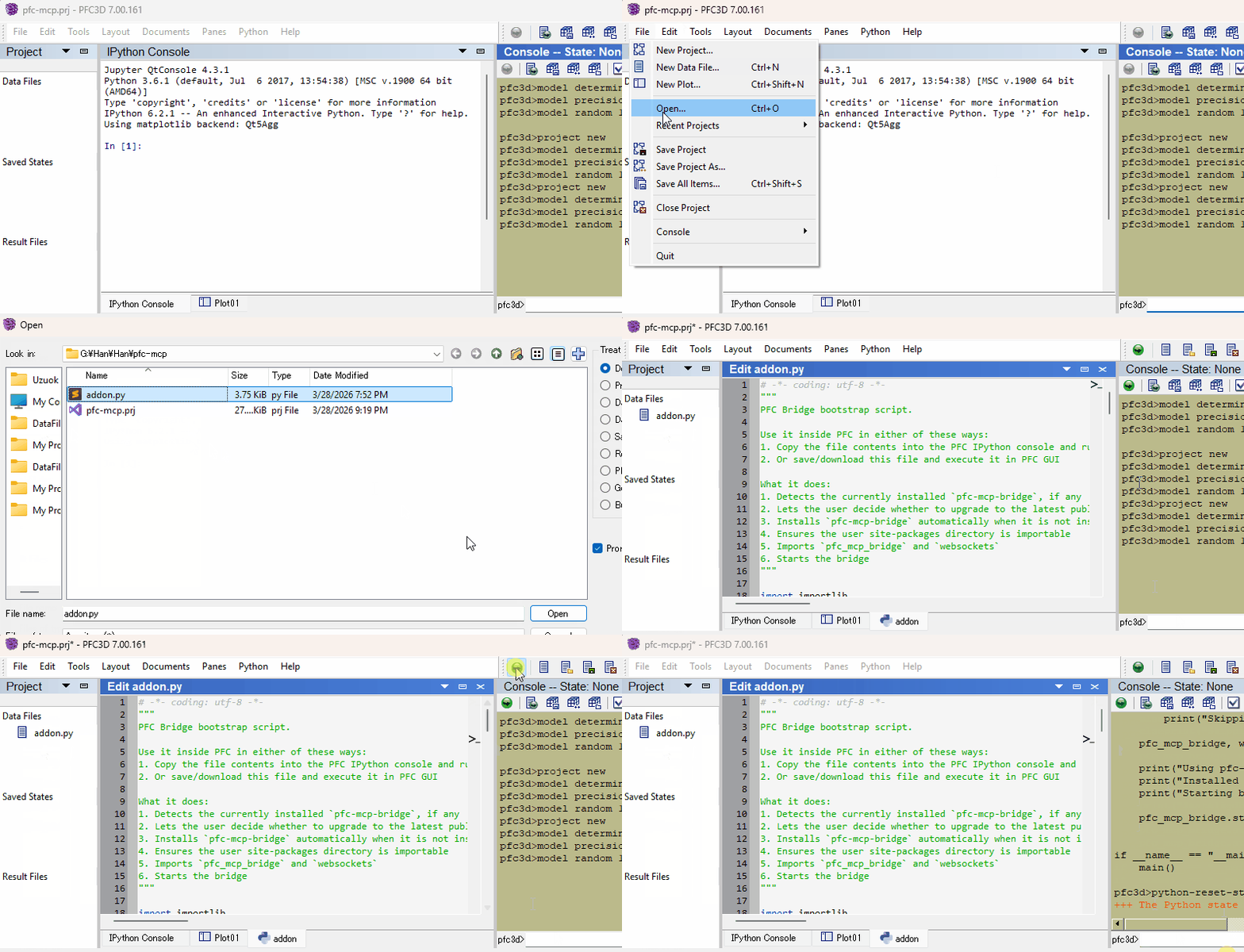
Download addon.py, then use either of these two flows inside the engine GUI (PFC, FLAC, 3DEC, ...):
Restart your AI agent and ask it to call itasca_execute_code to verify the connection.
Once first-time setup is done, each new engine session only needs the bridge re-started — run this in the engine's IPython console and you're back online:
import itasca_mcp_bridge
itasca_mcp_bridge.start()
start() checks PyPI for a newer bridge release and self-upgrades before starting. The MCP client config persists.
software and version parametersconsole.exeSee Troubleshooting in the bootstrap guide.
See Developer Guide: Install and Run from Source.
PRs and issues are welcome! See CONTRIBUTING.md for where changes land and how the documentation corpus is structured, and the Developer Guide for the source install.
MIT - see LICENSE.
Knowledge graph-based persistent memory system
MOmodelcontextprotocol/servers91k182 new stars in the last 7 days
Semantic search across Sui documentation and knowledge sources, powered by kapa.ai
MYMystenLabs/sui7.8k7 new stars in the last 7 days
Memory that reasons: continual learning for stateful agents. Better context, fewer tokens.
PLplastic-labs/honcho7.6k105 new stars in the last 7 days
5ire is a cross-platform desktop AI assistant, MCP client. It compatible with major service providers, supports local knowledge base and tools via model context protocol servers .
NAnanbingxyz/5ire5.4k6 new stars in the last 7 days
Search, read and cite papers from your Zotero library in any AI agent.
5454yyyu/zotero-mcp5.3k81 new stars in the last 7 days
Access Pollinations models and API capabilities through agent tools.
POpollinations/pollinations5.2k42 new stars in the last 7 days